
Add-ons › Extensions › Accessibility

Bubble Dictionary
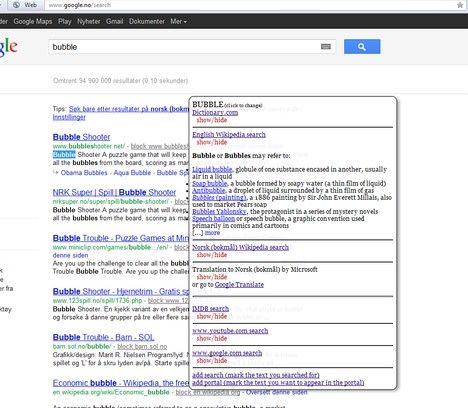
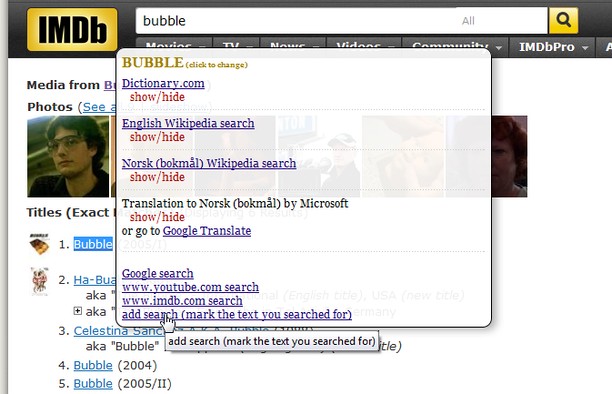
In any web page, you can mark text, and a bubble appears with customizable links and translations.
Description
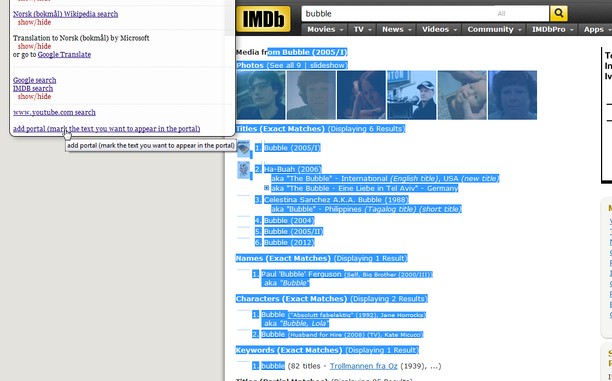
You can mark any text, sentence or word (double click a word to mark it).
The bubble contains links to different searches, but can also display results from the sites directly (portals). You can add your own links and portals very easily.
Clicking the button in the toolbar opens a popup with options, or you can make the content show in the popup instead of a bubble. The button can also be disabled, and the options can be accessed the regular way (extensions page -> [wrench]).
There are many options for how the bubble behaves.
With this extension I try to increase the ease with which you can navigate between information. It rose out of seeing words and phrases and wanting to look them up, but being to lazy to copy/paste.
This is still in beta, and suggestions and ideas are welcome :).
Screenshots
Download
Works with Opera 11 or later.
About this extension
| Downloads | 12,039 |
|---|---|
| Category | Accessibility |
| Version | 0.3 |
| Size | 32.6 KB |
| Last update | June 11, 2012 |
| Source | Offline copy of addons.opera.com, June 3, 2013 |
All versions
- bubble-dictionary-0.3-2.oex 33 KB (recovered copy)