
Add-ons › Extensions › Appearance

ContentBlockHelper
Helps you to block advertisements, tracking or any scripts and any annoying contents with easy methods. (Also supports Opera Mobile Labs.)
Description
This extension helps you to block advertisements, tacking or any scripts and any annoying contents with easy methods.
= Features
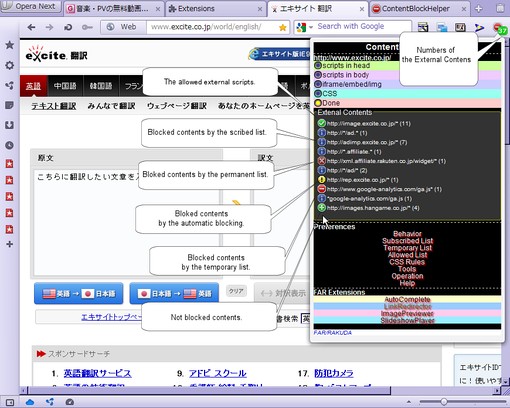
* Blocks advertisements by the subscribed filters. ("Fanboy(Main)" is enabled in default.)
* Adds rules by clicking elements that you want to block.
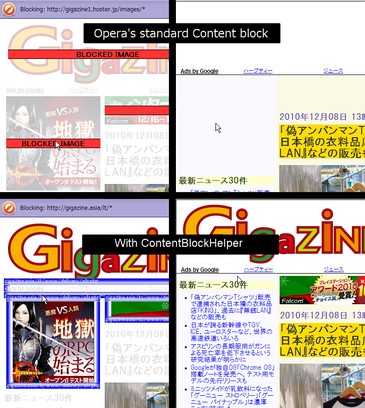
* Enables to add URL of iframes or scripts by clicking on Opera's standard Contents Block mode.
* Hide annoying elements by the CSS selector rules.
* Forbids to execute scripts of the page. (Disabled in default)
* Supports importing AdBlock Plus 1.1 lists. (Also part of $third-party or others)
* Helps you to transition to the blocking environment without extensions. (Export CSS and Register to Parmanent list)
= Usage
== Block advertisements by subscriptions
Fanboy(Main) is enabled in default. Turn on your wanted subscriptions in the Subscribed List and click "Start to subscribe".
== Import AdBlock Plus 1.1
When you import by clicking "Import a file of AdBlock Plus 1.1", then converts filters and those are added to the Temporary List or the CSS rules tab, however these have not saved yet. Go to each tabs and save them.
If you turn on the import options, the filters will be converted more strict, however note that the processing load is increased.
== Add blocking rules
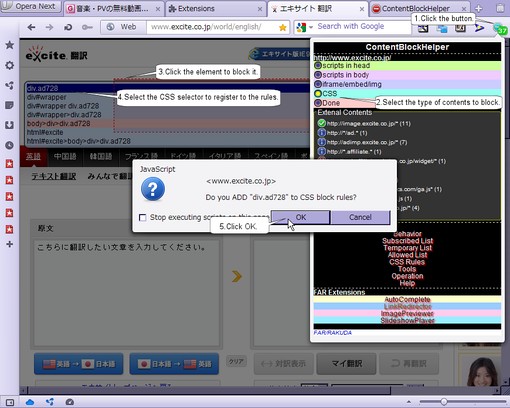
# Click the extension UI Button of ContentBlockHelper.
# Click a button of the type of contents you want to block.
# Click a element which you want to block.
# Choose a rule from the popup list and click it.
# Click the extension UI Button of ContentBlockHelper.
# Click the button of "Apply all blocking rules.".
# Reload the page, if added rules were not applied.
== Forbids executing scripts
This function is disabled in default. You can enable it on the Behavior tab.
; Off : Allows to execute scripts.
; Third party scripts : Scripts of inline and same domain and sub domain are executed.
; External scripts : Scripts of inline and same damain are executed.
; All scripts : Forbids execute all scripts of the page. If you want to execute them in certain page, add an URL pattern of the page to the allowed list.
If you click the button "Allow to execute SCRIPTs temporarily." on the top-right of the popup, the page is reloaded with executing all scripts.
== Register to Parmanent List
You can register the temporary rules to Opera Link in the preferences page. Registered rules are removed from the temporary rules.
== Support Opera Mobile Labs
If you enabled the "Apply Permanent List by URL Filter API of the Opera extension." option, you no longer need to edit the urlfilter.ini. You only should get URL Filter from your Opera Link account.
= Similar Extensions
* Opera AdBlock
* NoAds Advanced
* NotScripts
* External Scripts
You can compare it with them!
Screenshots
Download
Works with Opera 11 or later.
About this extension
| Downloads | 105,974 |
|---|---|
| Category | Appearance |
| Version | 7.0.1 |
| Size | 254.2 KB |
| License | Full license text |
| Support | Support page |
| Original page | Internet Archive |
All versions
- contentblockhelper-7.0.2-1.oex 266 KB (recovered copy)
- contentblockhelper-7.0.1-1.oex 254 KB