
Add-ons › Extensions › Tools

Cryptonify
The browser extension for the password manager 'Cryptonify'
Description
The browser extension for the password manager Cryptonify is here!You do not know about Cryptonify? It is a free password managing tool supporting all major operation systems!You can download it from this web page: http://www.marcel-carle.de/software/cryptonify/
Save yourself the hassle of copy between Cryptonify and your browser! The extension automatically shows, if Cryptonify has some entries for the current web page.Just click on the extension icon and select the desired login. The extension will automatically enter the user and password in the fields on the current web page.
Or you want to create a new login from the browser?No problem! Just click on the extension icon and select "Create new entry". Cryptonify will popup and once you have created the entry in Cryptonify, the user and password will be entered automatically in the fields of the current web page.
Screenshots
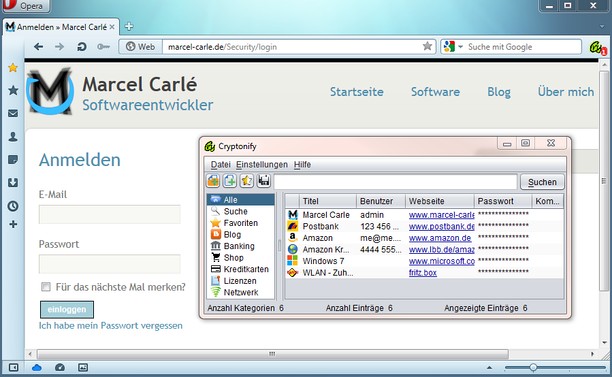

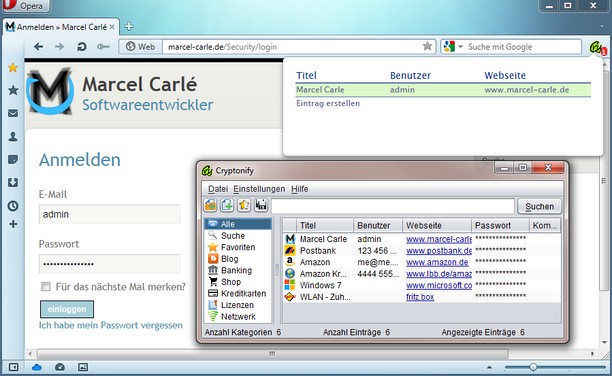
Download
Works with Opera 11 or later.
About this extension
| Downloads | 73 |
|---|---|
| Category | Tools |
| Version | 2.0.1 |
| Size | 106.2 KB |
| Last update | May 14, 2013 |
| Source | Offline copy of addons.opera.com, June 3, 2013 |
All versions
- cryptonify-2.0.1-1.oex 106 KB (recovered copy)