

GCPersonalisationFix
Removes GCVote stars for invisible caches on the new geocaching.com map.
Description
Description :
Premium-Member on geocaching.com can hide found/hidden Caches on the new map.
Although the icons are hidden than, GCVote-stars are still visible.
This script tries to fix this problem.
Requires: GCVote
Installation :
1. Install the script
2. Visit: http://www.geocaching.com/my/
3. Follow the instructions to let the script learn your found/hidden caches.
4. When you are back on the profile page, the learning process has finished. (The options are in the right column)
5. Install GCVote if it is not installed yet
6. Enable the "enableGcPersoFix" setting of GCVote
7. Visit the map page: http://www.geocaching.com/map/
8. Confirm the two questions
Usage:
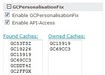
- The script detects new logs automatically and adds them to the fount caches list. -> You just let the script learn once
- For new hidden caches, visit the profile-page and click on "Owned Caches:" or add them there manually.
Note:
Get GCVote here: http://gcvote.com
However the new map is not supportet by GCVote yet.
A BETA version of GCVote with new map support is available here:
http://www.geoclub.de/viewtopic.php?f=111&t=61795 (German thread)
Many thanks to Angrentil for support and testing!
Screenshots

Download
Works with Opera 11 or later.
About this extension
| Original page | Internet Archive |
|---|
All versions
- gcpersonalisationfix-1.1.0-1.oex 16 KB (recovered copy)