
Add-ons › Extensions › Productivity

iFrame
Browse using a popup iFrame to preview link or search text before you open it. Very useful for browsing Google search result, Craigslist. A simple alternative for Firefox's CoolPreviews and Google Chrome's ezLinkPreview
Description
After installing the extension:
1. Hover a link to show a tiny box on the right of the link
2. Click the tiny box to open an iFrame to preview the link
3. Drag the top bar to move the iFrame, drag the right bottom corner to resize it
4. Click outside the iFrame to close it
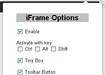
5. Option page on toolbar button:
- Enable/Disable
- Activate with Ctrl/Alt/Shift Key or their combination
- Show Tiny Box on link or directly show the iFrame link preview
- Show/Hide Toolbar Button
- Custom size and position
- Default search text (leave blank to disable)
Search query examples: (don't forget %s)
http://www.bing.com/search?q=%s
http://yahoo.opera.com/search/?q=%s&fr=opera2
Note: Google prevents opening search result in an iframe
Screenshots


Download
Works with Opera 11 or later.
About this extension
| Downloads | 6,258 |
|---|---|
| Category | Productivity |
| Version | 0.5 |
| Size | 5.9 KB |
| License | Full license text |
| Support | Support page |
| Original page | Internet Archive |
All versions
- iframe-0.5-1.oex 5.9 KB (recovered copy)