
Add-ons › Extensions › Pictures

Image Stream for Speed Dial
Your favorite newsfeed syndicated images in your speed dial.
Description
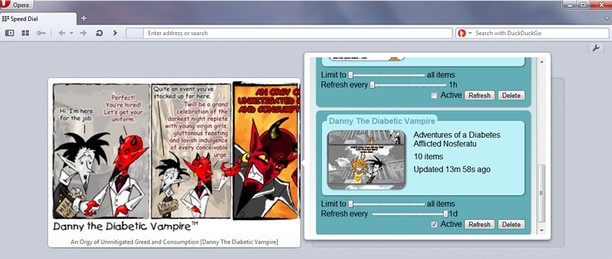
Image Stream displays images from newsfeeds in your speed dial.
Image Stream was originally conceived to preview the latest updates from webcomic and cartoon publishers but it's great for images of all kinds from animated GIFs to breaking news stories from your local news provider. It is especially useful for automatically panning over very tall or wide images. Click on the Image Stream speed dial when you wish to go to the webpage linked to the image being displayed.
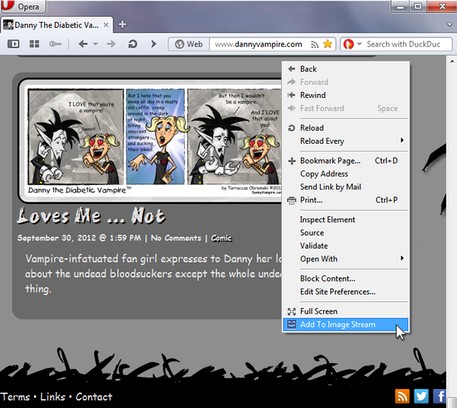
Adding newsfeed subscriptions to Image Stream is simple by right-clicking on a webpage or link and selecting "Add To Image Stream" from the menu that appears. When a newsfeed is discovered and it contains images, a chime will sound indicating that the newsfeed was successfully added. If not, a thud will sound indicating failure. Subscriptions can also be added in the Image Stream preferences window.
Subscriptions are easily managed in the preferences window where the frequency a newsfeed updates or the number of images a newsfeed displays are customizable. The speed at which the images are displayed can also be edited.
* Only RSS feeds supported currently.
Screenshots
Download
Works with Opera 11 or later.
About this extension
| Downloads | 311 |
|---|---|
| Category | Pictures |
| Version | 1.0 |
| Size | 217.4 KB |
| Last update | April 4, 2013 |
| Source | Offline copy of addons.opera.com, June 3, 2013 |
All versions
- image-stream-for-speed-dial-1.0-1.oex 217 KB (recovered copy)