
Add-ons › Extensions › Music

keySharky
Add missing keyboard functionality to Grooveshark!
Description
Add missing keyboard functionality to Grooveshark!
Status of keySharky for Opera (as of May 10th, 2011)
http://grooveshark.com/#/ - works
http://preview.grooveshark.com/#/ - works
-----------
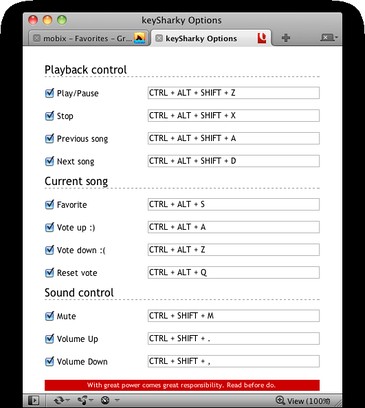
If you don't like default keyboard shortcuts, you can change them by going to "Tools > Extensions > Manage Extensions", then finding keySharky entry and clicking on gear icon where you must select "Preferences". Now in keySharky Options tab, click inside input box of shortcut you want to change (so it has focus) and then press any allowed keyboard combo. If it is valid (in some cases they doesn't work even if they are valid), it should change immediately for your usage pleasure :)
Note: you can't test new (or old) combos within keySharky Options tab. So keep another tab opened for that.
Default "Playback control" keyboard shortcuts:
* Ctrl + Alt + Shift + Z to Play/Pause selected song
* Ctrl + Alt + Shift + X to Stop playing song
* Ctrl + Alt + Shift + A to select previous song in playlist
* Ctrl + Alt + Shift + D to select next song in playlist
Default "Current song" keyboard shortcuts:
* Ctrl + Alt + S to favorite it
* Ctrl + Alt + A to vote up :)
* Ctrl + Alt + Z to vote down :(
* Ctrl + Alt + Q to reset vote
Default "Sound Control" keyboard shortcuts:
* Ctrl + Shift + M to mute
* Ctrl + Shift + . to increase volume
* Ctrl + Alt + , to decrease volume
Screenshots
Download
Works with Opera 11 or later.
About this extension
| Downloads | 2,841 |
|---|---|
| Category | Music |
| Version | 1.5.7 |
| Size | 7.7 KB |
| Last update | July 4, 2011 |
| License | Full license text |
| Support | Support page |
| Original page | Internet Archive |
All versions
- keysharky-1.5.7-1.oex 7.7 KB (recovered copy)