
Add-ons › Extensions › Pictures

Rehost to Imgur
Upload images from web page to imgur.com using image context menu
Description
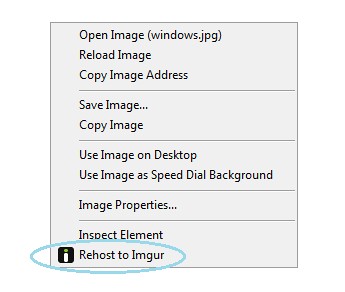
1. Right click on image you want to upload2. Select "Rehost to Imgur"Imgur will be opened in new page and in case of success there will be links and codes for uploaded image
Screenshots
Download
Works with Opera 11 or later.
About this extension
| Downloads | 296 |
|---|---|
| Category | Pictures |
| Version | 1.1 |
| Size | 3.0 KB |
| Last update | April 5, 2013 |
| Source | Offline copy of addons.opera.com, June 3, 2013 |
All versions
- rehost-to-imgur-1.1-1.oex 3.0 KB (recovered copy)