
Add-ons › Extensions › Accessibility

Rotten Tomatoes
Get Rotten Tomatoes rating or open movie page for highlighted text
Description
USAGE
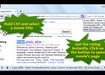
Hold Ctrl and select movie name on the page and get movie rating on the icon instantly. Click on "Rotten Tomatoes" button to open this movie's page in a new tab.
IMPORTANT
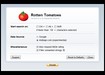
If you can't get the extension working, please make sure you're holding Ctrl key when selecting a text. On preferences page you can change the hotkey.
NOTES
* It will not work for pages that were opened before the extension had been installed. Just reload the page and you are done.
* In some cases the rating you get on the icon can differ from the one on the Rotten Tomatoes page a little bit. It's intended behavior as this allows considerably save your network traffic and improves extension's performance.
* The extension is asking Google when performing rating request.
* Using imdbapi.com (see preferences page) you will get more movie information, but it responds slower than Google and it’s not very stable. You choose.
Liked the extension? Rate it 5-stars!
Screenshots
Download
Works with Opera 11 or later.
About this extension
| Downloads | 1,855 |
|---|---|
| Category | Accessibility |
| Version | 0.4.3 |
| Size | 16.7 KB |
| License | Full license text |
| Support | Support page |
| Original page | Internet Archive |
All versions
- rotten-tomatoes-0.4.3-1.oex 17 KB (recovered copy)