
Add-ons › Extensions › Tools

scriptweeder
Block unwanted scripts. Noscript on steroids for opera !
Description
Like noscript, scriptweeder gives the user control back over which scripts are loaded in a page. It is much much nicer to use however, no need to fight with every new website here !
I embarked on this project because i wasn't thrilled with what was available for opera at the time. Main goal is to provide:
- an interface that's a treat to use, right under your hand
- filtering logic that is both powerful and easy to use.
It's got a few unique features:
- Toolbar/Page button display
- Zero click interface, just mouse over!
- Custom style support !
- Disable javascript but allow userjs and extensions to run.
- block scripts in iframes
- Different filtering modes
Userjs version:
External script blocking is fully functional, but like all extensions it cannot block the first inline script of a page. A userjs version of scriptweeder is also available which has no problem with this. It's even possible to install them together to get the best of both worlds: the extension provides the toolbar button, and userjs sound script blocking =)
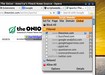
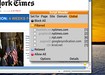
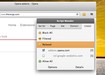
The first two screenshots show the default interface in toolbar and page mode. Last one uses 'Clear Style' custom style by laurenbacall.
More info in the support page.
Screenshots
Download
Works with Opera 11 or later.
About this extension
| Downloads | 845 |
|---|---|
| Category | Tools |
| Version | 1.5.1 |
| Size | 48.6 KB |
| Last update | March 7, 2013 |
| License | Full license text |
| Support | Support page |
| Original page | Internet Archive |
All versions
- scriptweeder-1.6.0-1.oex 61 KB
- scriptweeder-1.5.5-1.oex 51 KB (recovered copy)