
Add-ons › Extensions › Accessibility

Search In New Tab
This extension adds an option named "Search In New Tab" to Opera's context menu.
Description
Note : This extension will work only for Opera 12.10 beta and onwards.
This extension lets you search your selected text in a new tab. It adds an option in the context menu, thus making the functionality only a "right-click" away.
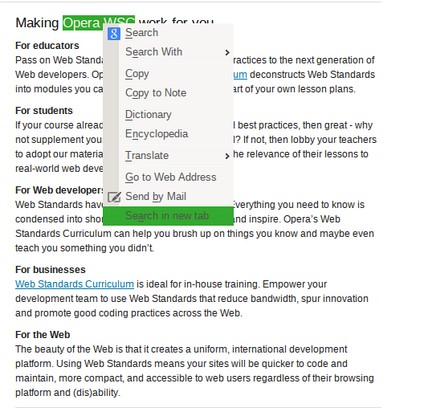
Opera provides a context-menu option to search selected text. However, it opens the search results in the same webpage.This extension adds another option named "Search in new tab" in the context menu, which will launch a new tab for the search results.
How to Use It1. Select some interesting text in a webpage. 2. Right-click on the selected text. 3. The context menu will have an option named "Search in new tab". Clicking it will open a tab displaying the search results.
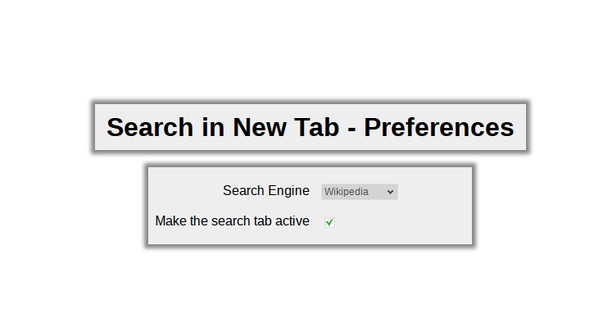
Features :1. The context-menu option is unobtrusive, i.e., it appears only when you right-click on some selected text.2. You can set a search engine from Google, Bing, Yahoo!, Wikipedia and DuckDuckGo. The default search engine is, of course, Google.3. You can specify if you want the new search-results tab to become active or not. Marking it active will shift browser's focus to the new search tab; otherwise, the tab opens in background.
Screenshots
Download
Works with Opera 11 or later.
About this extension
| Downloads | 3,139 |
|---|---|
| Category | Accessibility |
| Version | 1.3 |
| Size | 27.5 KB |
| Last update | November 1, 2012 |
| Source | Offline copy of addons.opera.com, June 3, 2013 |
All versions
- search-in-new-tab-1.3-1.oex 28 KB (recovered copy)