
Add-ons › Extensions › Productivity

TabSearch
With TabSearch you can search for the URL or title of an opened tab to focus it.
Description
Do you know the feeling when you have opened a bazillion of tabs and you just can't find the one you need? With this widget you can easily search for a text or title of the wanted tab and open it!
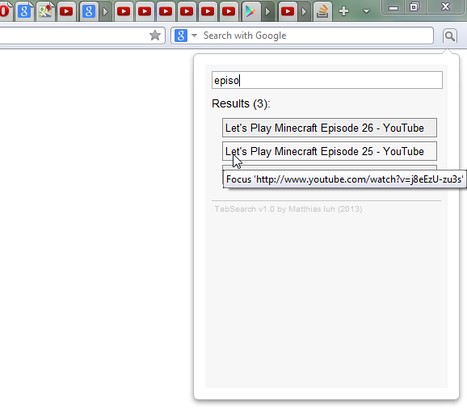
TabSearch is a tiny extension which will add a small button to your Opera Browser. If you click it, a popup window appears, asking you what to search for. Just type in a part of the URL (e.g. 'example.org') or the Title (e.g. 'My Basket') of the tab you look for and TabSearch will return you all matching opened Tabs. Just click on a result box to focus the desired background tab. Alternativly, you can press Enter to open the first result quickly.
Unfortunately, in the current version you can only search for the URL or the title of a tab. Maybe searching in the content of a site will be a feature of a major version.
Screenshots
Download
Works with Opera 11 or later.
About this extension
| Downloads | 277 |
|---|---|
| Category | Productivity |
| Version | 1.1 |
| Size | 6.3 KB |
| Original page | Internet Archive |
All versions
- tabsearch-1.1-1.oex 6.3 KB (recovered copy)