
Add-ons › Extensions › Appearance

Theme-up Webpage
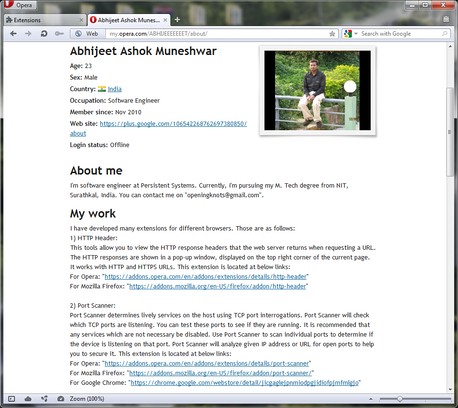
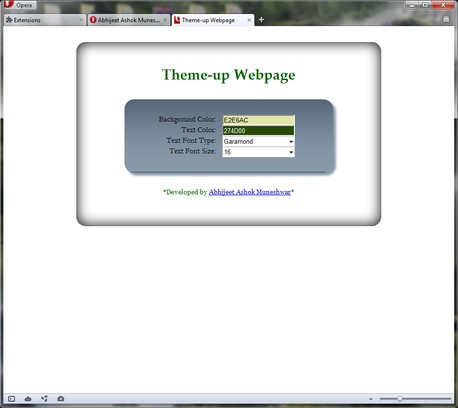
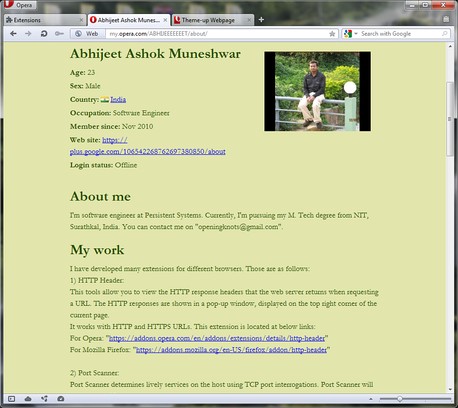
This extension allows you to apply different background colors, text colors, font types and font size for any webpage. This extension is the next step of my old extension 'Night Mode' and 'Dressup Webpage'.
Description
About:The purpose of this extension is to let you easily change the colors & text of any web site you want.
Why?1. Perhaps you want to get an impression of how your own site looks like in different colors & different font.2. Or the color set of a specific site/page causes headaches. Why not change it?3. Or you simply like to experiment.
How?1. Go to a) Menu -> Extensions -> Manage Extensions... b) Click on settings icon of 'Theme-up Webpage' extension. c) Click on preferences. d) There you can see the 'Preference' page of 'Theme-up webpage' extension.2. Select the values for background color, text color using color picker and text font type and text font size from drop down box.3. That's all. You are done.4. Refresh already opened web pages or open new web pages to see the new Themes.
Limitations:1. Whether color edits on one web page apply or not, depends on the sites CSS structure.
To turn off/on this extension, disable/enable it from the 'Manage Extensions' page which can be accessed by the Ctrl+Shift+E keyboard shortcut.
This extension is the next step of my old extensions 'Night Mode' and 'Dress-up Webpage'.The link for 'Night Mode' extension is:https://addons.opera.com/en/extensions/details/night-mode/
The link for 'Dressup Webpage' extension is:https://addons.opera.com/en/extensions/details/dress-up-webpage/
Screenshots
Download
Works with Opera 11 or later.
About this extension
| Downloads | 4,579 |
|---|---|
| Category | Appearance |
| Version | 1.0.1 |
| Size | 34.1 KB |
| Last update | June 22, 2012 |
| Source | Offline copy of addons.opera.com, June 3, 2013 |
All versions
- theme-up-webpage-1.0.1-1.oex 34 KB (recovered copy)