
Add-ons › Extensions › Tools

URL Cleaner
Silently removes redirect information from URLs.
Description
The primary goal with this extension is minimalism; it modifies the original link with a weighted system in order to grab the most likely final URL.
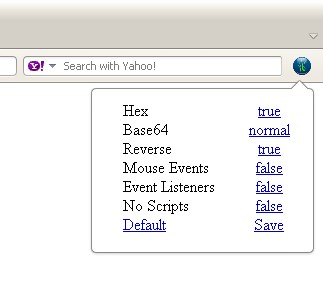
Since the URL Cleaner may clean the wrong parts of a URL, I have included a taskbar button; thereby allowing quick disabling of various cleaners, without the need of refreshing the page.
Hex deals with the most basic cleanersPercent / Hex Encoding, ?url=, domain.com/https://, domain.com/www.
Base64 deals with Base64, though is currently only tailored to recognize 'aHR0c' (http)
Base64+ is an more aggressive Base64 cleaner. It, infact, is actually a Base64 decoder and actively decodes the url searching for "://". This solves the "Http" "SHR0cA==" or "hTTp" aFRUcA== (It would also catch other protocols, such as ftp://) that would not be caught with the previous method.(Some Base64 urls have been seeded with extra characters to prevent automated decoding and this method may occasionally decode enough of a "dirty" base64 url to catch the protocol indicator. This will result in a nonvalid url replacing the old url.)
"text/html" extends Base64+ by expecting a quoted url -- "x" or 'x'.
Reverse deals with reverse URLs, sans any real encoding. It requires the protocol be present though.
"Event Listeners" deals with some potentially buggy listeners (DOMAttrModified, DOMNodeInserted). These allow the extension to detect other scripts trying to modify or add anchors, but have known issues.
"Mouse Events" removes "onmousedown" from all urls.This is HIGHLY recommended to only be turned on when needed. Other sites DO use mouse events on anchors for valid reasons. The other mouse events have not been added yet because of how brute force this method has become (previously, they would only be removed if the url was dirty), and how many sites it has the potential to break.
No Scripts is included for the convenience of disabling scripts without disabling UserJS.
Saving / Setting of Defaults is now supported (though I consider it beta).
Screenshots
Download
Works with Opera 11 or later.
About this extension
| Downloads | 5,474 |
|---|---|
| Category | Tools |
| Version | 1.2.6-b |
| Size | 11.0 KB |
| Last update | August 8, 2012 |
| Source | Offline copy of addons.opera.com, June 3, 2013 |
All versions
- url-cleaner-2-1.2.6-b-1.oex 11 KB (recovered copy)