
Add-ons › Extensions › Tools

WingedBookmarks
Temporary bookmarks for Opera
Description
Implements the functionality of a bookmark in ways more consistent with the concept of bookmark.
Automatically retrieves the URL of the tab in the foreground.
For example, if you're reading a comic book on the internet, with this extension you can save the page you came from, overwriting each time the bookmark, without having to add a new one in the normal management of browser's bookmarks (bookmarks which then must inevitably be deleted.)
If you want to read a web-page at a later time, but you're not interested in adding it as a favorite, with this extension you can easily save it,open it when you want to read it, and remove it.
The extension allows you to save, overwrite, rename, and delete bookmarks.
********************* Operation: *********************
When you open the plugin automatically detects the address of the current tab and copy the URL in the input to be saved.
********************* Navigation bookmarks: *********************
You can navigate between bookmarks available through the navigator, located immediately below the textarea for entering the URL.
At a pressure of one of the 15 navigation buttons it will display the corresponding page of bookmarks.
The buttons are colored if the corresponding page contains saved bookmarks.
********************* Save a new bookmark: *********************
Insert into textarea at the top the URL that you want to save,
or leave that shown (corresponding to the tab in the foreground).
Press the "enter" key to save the bookmark to the first free position, or click on the ">" with the mouse LEFT button on an empty slot.
********************* Overwrite bookmarks: *********************
Click on the ">" with the LEFT mouse button at the bookmark you want to overwrite.
********************* Renaming bookmarks: *********************
Click with the RIGHT mouse button on ">" at the bookmark you want to rename.
Change the label of the bookmark and confirm the action by clicking on "OK" or press the "Enter" key.
********************* Removing bookmarks: *********************
Click with the LEFT mouse button on the "X" button at the bookmark you want to remove.
********************* Select / deselect bookmarks: *********************
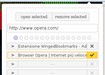
Click with the RIGHT mouse button on the "X" button at the bookmark you want to select or deselect.
********************* Opening / removal selected bookmarks: *********************
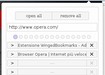
After selecting the bookmarks you want to open/remove click on "Open selected"/"remove selected".
********************* Export of bookmarks stored: *********************
From page preferences click on "export bookmarks".
In the textarea beside the button will display a text string.
Copy and paste the string that appears in a blank text file, which must contain only this string.
********************* Import bookmarks saved: *********************
In the preferences page, from the section "Import/Export bookmarks", select the text file that contains the previously saved backup bookmarks.
Then click on "import bookmarks" to confirm the action.
Screenshots

Download
Works with Opera 11 or later.
About this extension
| Downloads | 380 |
|---|---|
| Category | Tools |
| Version | 3.0 |
| Size | 57.4 KB |
| License | Full license text |
| Support | Support page |
| Original page | Internet Archive |
All versions
- wingedbookmarks-3.0.1-1.oex 58 KB (recovered copy)
- wingedbookmarks-2.2-1.oex 51 KB