
Add-ons › Extensions › Entertainment

YTCCD
Extension downloads YouTube closed captions in SRT subtitle format.
Description
This extension downloads YouTube closed captions in SRT subtitle format.
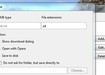
You need to set extension to «srt» and action to «Save To Disk» for «text/srt» MIME type manually via Settings->Preferences->Advanced->Downloads->Add. Otherwise Opera will open subtitles as an unknown type.
To download captions select language from dropbox near «Subscribe» button. Then in the «Save as...» window type-in subtitles name and click «Save» button.
YouTube don't publish auto-generated subtitles so you can't download them with the extension.
Screenshots
Download
Works with Opera 11 or later.
About this extension
| Downloads | 16,292 |
|---|---|
| Category | Entertainment |
| Version | 1.5 |
| Size | 14.1 KB |
| License | Full license text |
| Support | Support page |
| Original page | Internet Archive |
All versions
- ytccd-1.5-1.oex 14 KB (recovered copy)