
Add-ons › Extensions › Tools

Zen Broadband Usage Checker
Fetches the current broadband usage information from the Zen portal and displays it on the Opera toolbar
Description
This is a port of the Zen Internet broadband usage viewer which is available for other browsers. After installing the extension you will need to right click on the Zen Internet logo on your toolbar and enter your Zen portal username and password in the preferences. If you do not yet have a Zen portal account then you will need to create one at https://portal.zen.co.uk/
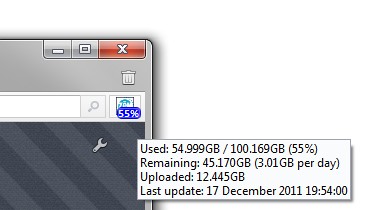
The extension will then automatically retrieve your broadband usage from the portal and display the amount you have used as a percentage. To get some more detailed information, mouse over the icon to see the tooltip.
The data is updated every 15 minutes from the Zen portal, but the portal is typically a few hours out of date so you won't see the number change immediately after downloading.
Screenshots
Download
Works with Opera 11 or later.
About this extension
| Downloads | 586 |
|---|---|
| Category | Tools |
| Version | 1.2 |
| Size | 17.9 KB |
| License | Full license text |
| Original page | Internet Archive |