

11 Clean
Classy take on the standard skin for Opera 11. For Windows 7, Vista, and XP. Looks good on Aero, Basic, as well as Luna (XP).-Prettier tabs :
Description
Classy take on the standard skin for Opera 11. For Windows 7, Vista, and XP. Looks good on Aero, Basic, as well as Luna (XP).
-Prettier tabs : Great for configurations with tabs or thumbnails on either side --- they're attached to the page just like regular tabs on top. « (Click for a screenshot of side tabs)
-Tabs on top can be clicked at the top of the screen when maximized, as in e.g. Google Chrome.
-Prettier speed dial
-Prettier addressbar : Rounded corners
4.0.1
-Tab-stacking at least a little better on top...
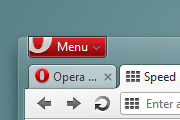
Screenshots
Comments (197 on the original page, latest shown)
Download
Works with Opera 7 or later.
About this skin
| Downloads | 1,897,667 |
|---|---|
| Version | 4.0.1 |
| Original page | Internet Archive |
All versions
- 11_clean-4_0_1.zip 956 KB
Окуенно тащемта получилось
Doesn't work with Opera 12. Black background on Find bar. A number of skins faced this fate with 12 Next during the beta stage. Don't know if it will help, but another skin I found a fix for black in the Address Bar in the thread at http://my.opera.com/community/forums/topic.dml?id=1426952 .
Gut
Thank you for showing skin to normal Opera 11.60
The New Tab button (plus sign) is too dark, but otherwise it looks very nice; like the older, better default skin. Thanks.
Hi, thanks for this great skin. Especially for the tabs-thumbnails work. Great job.
He won't, look at the previous posts. He doesn't care about this skin anymore. And it's very outdated now.
hey. Today I've just found that there's a new default skin in Opera 11.50. Do you want to change Clean skin in some way to be more... you know grey and modern as the default one? Otherwise that skin is the best because tabs are just in top of the window.
Cool, but adjust the bookmarks bar to the one above please.
Nice! I like it. The one thing I could complain about is all the lines that appear when Personal toolbar is on. There is a line over and under, and there is no need for it. Otherwise, slick.
How do I get the transparency to work? I just get a dark background. I've enabled aero transparency in Windows Vista 64x. I've got Opera 11.11.
Close tabs button could be a little bigger, speed dial doesn't fit to the screen properly when automatic zoom and columns are enabled, otherwise the skin looks great,clean, functional. Brilliant.
Please make "Closed tabs" button look like default. custom one looks bad. Very good skin otherwise.
ja estou usando essa skin =D
nice, clean and simple, this skin has all you need - it´s legendary;) i hope the devs will reimplement the speed-dial transparency soon, so that this skin will rock even more.
Great skin. This should be the default look for Opera 11. Default color of the address menu bar is a bit lighter than the default somewhat beige-gray? (Windows 7 Aeor without glass effect enabled) It makes browser feels not as dark as the default skin. Thanks.
He obviously doesn't care anymore about this skin. Oh well.
Originally posted by ObeseMaurice: Evilcokemachine, fix those bugs. *sigh*
love it, simple, clean and beautiful. way better than the standard skin