

Default Skin Without Top Tab Gap
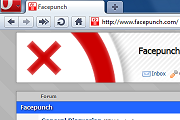
*For 10.60 only*I modified the default Opera skin and removed the annoying gap that separates the top tabs with the top of the screen when maximized. This places the tabs right at the edge of ...
Description
*For 10.60 only*
I modified the default Opera skin and removed the annoying gap that separates the top tabs with the top of the screen when maximized. This places the tabs right at the edge of the screen and makes the top tab bar more like Chrome's.
Since having to constantly fix the skin with each new version is very annoying, I've now started to release these as a modification solely for the latest stable release at the time. Previously, I had to modify the skin in such a way that the user wasn't required to modify any of Opera's settings to make it work, and I tried to only include the necessary code to make it work. From now on users will need to perform the tweak below, but this makes it a lot easier for me (less changes are needed).
IMPORTANT: To make this work, you must change "Chrome Integration Drag Area Maximized" to 0 in opera:config. You can do this here:
opera:config#Chrome%20Integration%20Drag%20Area%20Maximized
If for some reason a new stable version of Opera is released and I haven't updated the skin, these are the modifications you need to make to your default Opera skin's skin.ini (usually in C:/Program Files/Opera/skin/standard_skin.zip):
Under [Pagebar Button Skin], change "Margin Top" to 0.
Under [Pagebar Thumbnail Button Skin], change "Margin Top" to 0.
This should be basically all you need to change, but feel free to leave a comment if I'm missing something.
Screenshots
Comments (59 on the original page, latest shown)
Download
Works with Opera 7 or later.
About this skin
| Downloads | 90,715 |
|---|---|
| Version | 7 |
| Original page | Internet Archive |
good work!
Originally posted by WOFall: Well then you broke it again. Yes, as I so accurately described in the skin details area at the top of this very page. It's easier this way. Deal with it.
Originally posted by MisterMooth: Originally posted by sutekh: Why didn't you omit the parts you didn't change? It would make the skin much smaller and you wouldn't have to update it every time something changes. Good idea. Fixed it up. Well then you broke it again.
Have you notice that when you Enable the Personal Bar a new bar appears just on top of it, it says the name of the webpage in which you are, me being a Chrome would love to get rid of that extra space....yours its amazing dude.
Zach, dude - awesome mod. Useful as hell for those 90-tabs-overview situations. Can you write up a short blog post or comment or whatever with the steps you used to mod the skin? That way we won't have to bother you with "when are you going to do ver 10.60.32876-whatever" comments every week, and the more obsessive-compulsive of us will be able to use the latest skin at all times (and I'll get a basic idea of the skinning process in Opera). Cheers [Edit] Never mind, I figured it out - I just followed the instructions under "Option 2:" in http://my.opera.com/community/forums/topic.dml?id=434891&t=1278586553&page=1#comment4954751
10.60 has some small changes by now, and still continues. Just have a question will you update this skin again after the 10.6 official release? It woudln't be nice to update a growing baby. . .
I actually didn't need to modify anything to get the Menu button over to the corner. That setting is kept exactly how it is in the default skin, but I just made it two pixels lower so it's not cut off on the top. It's just that my preexisting skin from 10.53 keeps that button in the corner if it's loaded in 10.60.
However again noticed this on Opera's 10.60 STANDARD SKIN: And your version 4 seems nice - but if you'll mod the Menu, I guess the "Default skin" name won't be nice anymore: And the latest v6: PS as you can see on OPERA'S STANDARD 10.6a SKIN the Menu is horribly not in place right?
Thanks again. Fixed it up. What would I do without you
Just noticed this now, when HOVERING the "O" menu on 10.60, the color changes to crimson red, it doesn't match the Original 10.60 skin. . .
You could try it on 10.53 y'know, just simply un-install opera and quickly install 10.53, un-installing would keep everything fine just deletes the opera.exe file
Updated the skin. This should work in both 10.53 and 10.60. Please correct me if I'm wrong. I fixed the Menu button being cut off by the top of the screen in 10.60. Please let me know if it still looks fine on 10.53.
The current skin should work fine on 10.60.
Please make a 10.6 mod. A new skin Pls, if My Opera won't allow how about have it on you My Opera files Also pls fix the new O "menu" it looks horrible on 10.6! What I mean is it isn't the upper left.
Originally posted by MisterMooth: Once a stable 10.54 comes around I'll tweak that default skin as well. Sadly 10.54 was discontinued but has been REPLACED BY 10.6O! IT'S ALPHA NOW! Based on Facebook 27% of Opera users already tried 10.60 from 10.53 and Opera testers ofcoarse updated
Originally posted by konic: Well, what about Humanity 0.6.2 uploaded just couple days ago? Here it is now
Originally posted by pieRr0Ur: Cont: anymore, as you can see, no more skin have dot on the version. I noticed that just last month Well, what about Humanity 0.6.2 uploaded just couple days ago?
Originally posted by pieRr0Ur: The magic actually worked on linux, BUT only on thumbnails enabled Sorry, I can't test it on Linux. You can look at my skin.ini to see what I changed, and modify the default Linux skin yourself if you want.
Originally posted by pieRr0Ur: Anyways too bad, the magic doesn't work on Linux. Update!!!! The magic actually worked on linux, BUT only on thumbnails enabled
Cont: anymore, as you can see, no more skin have dot on the version. I noticed that just last month.