

Emil_RSD_Black
Created by request of Gary, this skin is just Emil_RSD skin with some modifications to make it look better in black.2 Sep ...
Description
Created by request of Gary, this skin is just
Emil_RSD
skin with some modifications to make it look better in black.
2 September 2009
Updated for Opera 10.00
I have added a small triangle to the tabs (only on top and bottom) so you can see when they have finished loading if you have many open. I hope you don’t find them annoying as they can be very useful.
Speed dials are now more transparent.
I have changed the close tab buttons so they don’t kill the roundness of the tabs.
I’ll keep using the wand for a while.
Screenshots
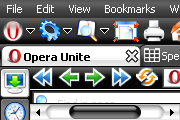
Comments (29 on the original page, latest shown)
Download
Works with Opera 7 or later.
About this skin
| Downloads | 135,768 |
|---|---|
| Version | 10.00 |
| Original page | Internet Archive |
All versions
- emil_rsd_black-9_60.zip 567 KB
- Emil_RSD_Black.zip 471 KB
Yes, Please update this
Skin does not work correctly with Opera 10.51 Please update it
Too many dark or black skins for my taste, but is great otherwise
Fully 10.0 Compliant, aside from one or two quirks (Most other skins seem to use a different icon for the [New Tab] menubar -- easily user changeable) Still the best skin for colour and compact use of space.
The [X] on the tabs also IMHO looked better before too. Yellow Octagons vs the grey squares now. Also the Yellow text on the tabs for pages that have been loaded (and not opened yet) was richer, the new yellow is very pale comparitively. (Not sure why I can't edit my posts, very strange)
Well I can't seem to edit my comment, says I don't have permission when I try and save it. So here's the addenum: I notice the lock.png was nicer (colour) previously, timestamp 04/22/2007. The new one is a bland grey lock?
Awesome! Updated for Opera 10. I had four couple "copies" of V9 in which I modified the .ini's to have different TabBar widths: 100/200/300 and 400. I run opera with TabBar's on the Left :-)
Excellent, the best skin I ever used! But hard to find... Lali, nekem fel sem tűnt odáig de ott tényleg bugos.
Hi, thes is very good job, but i found 2 bug: If i use this skin, than on by Shift+F12/button I don not see some icon, please see the pictures. Original opera skin: http://opera.extra.hu/kepek/bor1.jpg With your skin:http://opera.extra.hu/kepek/bor2.jpg
Excellent!!!
Shweet! I shall use it when my Windows theme is dark. Probably when I update to Vista or something.
No problems here with Opera 9.20
Excellent, nice update... thanx.
mmmm...It's not compatible with Opera 9.20
The best skin i've ever used - great work!
yeah I'm going to have to use them both for a while until I decide whether emil_rsd or emil_rsd_black is my favourite skin... Black is pretty sexy! The way inactive buttons are MUCH dimmer I like. I've gone to click on inactive buttons before in the normal skin before realising they are not active. Not so with this skin, you can see even with peripheral vision - same with the active tab. I like the yellow close buttons on the inactive tabs too.
I like it thanks, I'm gonna try the red one.
another wow... second best skin after Emil_RSD
Ah the best skin has been updated, maybe I can switch to Opera 9 now.
Xeophyte I can't do anything. It's an Opera's limitation. The only thing I could do was to reduce the size of the round part of the scrollbar.