

Emil_RSD
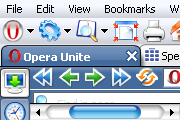
Based on Kreg Wallace's Emil skin with icons from Opera classic skin, a very optimized workspace and many new things.2 S ...
Description
Based on Kreg Wallace's
Emil
skin with icons from Opera classic skin, a very optimized workspace and many new things.
10 June 2009
Updated for Opera 10 beta 1
Just if you didn’t know, with this skin you can use
small
or
large images
almost everywhere.
If you have never done it, try the
Color schemes
You can also hide the
Menu bar
by deselecting the checkbox and clicking on save, and replace it by an Opera icon using this dropdown
button
If you like the Widgets shortcut, you can use this
button
Thanks to
Lars
and
ToMu
for making things easier.
Screenshots
Comments (55 on the original page, latest shown)
Download
Works with Opera 7 or later.
About this skin
| Downloads | 317,013 |
|---|---|
| Version | 10.00 b1 |
| Original page | Internet Archive |
All versions
- emil_rsd-10_00.zip 643 KB
- Emil_RSD.zip 466 KB
- [email protected] 473 KB
- [email protected] 439 KB
i don't remember when i started using it. maybe since 1996? this is the best and the most compact skin ever. thank you for well-timed updating.
I made some changes in: Pagebar Button Skin ........ Padding Top = 4 Padding Bottom = 3 ...... Personalbar Skin ....... Padding Top = -1 Padding Bottom = -1 ........ Before changes the buttons for "panel" and "speed dial" were cut. Now it's realy perfect! Greetings Heidrun1
It's my "favorite" skin for a long time. Thanks.
W O N D E R F U L ! ! ! Is my "default" skin !!! Congratulations !!!
As other posters have mentioned, I love the high contrast with the active tab & scroll bar. These two reasons was why I searched for a new skin, the first time ever !! My rating:- 5 plus plus plus +++ Fantastic work thanks. P.S. I signed up & joined just to add my appreciation here.
The preview looks nice to me. What are you still working on with it? Anything I can assit in testing?
Originally posted by Magus: Hi, really like your skin, are you gonna update it for Opera 9.50? I'm working on it. You can download a preview from here: http://www.mediafire.com/?tymiamd1n9t
Hi, really like your skin, are you gonna update it for Opera 9.50?
To be honest I wouldn't miss round scrollbars, square - or nearly square - is fine with me if it avoids the resulting strange graphic foibles.
james.faction I'm afraid that, as you said, the only solution to those problems is to make the scrollbars square. I have made the ends of the vertical scrollbar a bit smaller so it doesn't look so bad with long pages, but it can't really be fixed. About the problem with the oversized scrollbar and that gap, it can't also be fixed because the fixed ends of the scrollbar are not really buttons, but just background images. With oversized scrollbars, actually a transparent button is being oversized, that’s why they look the same but wider. If I used true buttons, the moving scrollbar would never overlap them anyway. I wish Opera developers add a better support for rounded scrollbars in future versions.
more on that scrollbar thing: if I set Windows to large fonts (I have a very high-resolution 17" screen and everthing is tiny), scrollbars get wider - and with the emil_rsd skin, a gap appears between the scroll indicator and the end button of the scrollbar. It looks like the scrollbar doesn't go all the way to the end. it's a minor niggle, I'm still loving the skin.
myjaka I don't speak Indonesian, but if you want more colors, you can try "color schemes": http://files.myopera.com/RSD/albums/307719/color_schemes.png It's not the same, but it doesn't look too bad. You can also use your own color schemes: http://operawiki.info/CustomColorSchemes
Saya lebih suka skin warna-warni. Thanks your give me new OPERA skin.
Saya lebih suka skin warna-warni. Thanks your give me new OPERA skin.
my only complaint is the ends of the scrollbar, I'd be happy to have a more square bar just so it doesn't look weird on very long pages.
My favorite skin for years, I was using the original version and I'm glad to see it was updated with newer icons, and also with IE and FF icons. My only gripe is that the minimum tab size is too large, but I can change on my copy to make it the perfect skin! Thanks!
The best skin I've ever seen for Opera, Thanks a lot. Maybe you could experiment with some new colors. I suggest Silver and/or gray. Again. Thanks a lot.
Thanks for reporting that bug AleksOD I have fixed and uploaded the skins. Just one detail... if you have the placed the address bar at the bottom , and selected the option “ Show inside the address bar ” for the progress bar. In order to make the progress bar look better, you have to: 1. Check the option “ Show hidden toolbars while customizing ” 2. Click on the Progress bar 3. Select the option Placement -> Bottom
Sweet update! Thank you so much! One thing, though. When I have the progress displayed in the address bar, the buttons jump up
Excellent, nice update... thanx.