

Freestyle
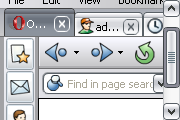
New metallic background & buttons. Looks better if navigation buttons (like back & forward) are placed in addressbar.For Opera 7.50x-8.0b. Updated 13 Jan 2005.
Description
New metallic background & buttons. Looks better if navigation buttons (like back & forward) are placed in addressbar.For Opera 7.50x-8.0b. Updated 13 Jan 2005.
Screenshots
Comments (60 on the original page, latest shown)
Download
Works with Opera 7 or later.
About this skin
| Downloads | 792,331 |
|---|---|
| Original page | Internet Archive |
All versions
- freestyle-1_0.zip 327 KB
The best skin i have ever used!!!
THanks!
good
beautiful!
great work
Me like a lot!
Wow this is my one and only favourite skin. I like the browser icons very much and how everything is well-defined. And the colours are so smooth with this skin. Thank you!
My favorite since i use opera (for 2 years)!
This skin is definitely my favorite. No skin comes even close.
This is my third favorite!
Seems to work fine with no editing for Opera 9.01! Glad I could help anyway.
Thanks for the detailed explanation, FusionXN1! I had to change the Padding values under [Tab Button Skin], [Tab Button Skin.hover] as well (not only under [Tab Button Skin.selected]) to make all the tabs fit. I chose a value of 6 for all of them.
Ok sure, No problem. The problem is small and will take around 10 seconds to sort Goto the Skin folder in the Opera Program Folder. Find "freestyle-1_0.zip". Extract the contents, now, just for the sake of keeping the original and backup lets change the name to Freestyle edited first. Open "Skin.ini" in notepad, find "Name=Freestyle" and change to "Name=Freestyle [EDITED]". Next, find "[Tab Button Skin.selected]", under there find "Padding Left" & "Padding Right". You will see they are both set to 12, and heres our problem. The padding is too big to fit all the tabs on so Opera 9 simple cuts it off so change it to 5 (you can increase descrese these to your liking but make sure you can see all tabs like Network I mentioned above). Save and close. Now you will need a program like 7-zip or winzip to make a new ZIP file. Add everyfile back into a new zip and name it "freestyle-1_0-edited.zip". Place it in your Opera Skin folder. Close and reopen opera, goto the skins menu and Select the new skin and congratulations, Opera 9 compliant! I only take credit for the editing steps the skin = copyright to original creator
@FusionXN1: Could you explain how you manipulated the skin for compliance with Opera 9? You know - just writing that you did it for yourself just makes the rest of us envious
Good Job
I liked this skin so much I modified this skin to work with Opera 9.0+ it now shows the network tab under edit site preferences.
What schould i say? Your skin is simply great =o)
It is my favourite skin. Well done
You you make it a bit more visible when you roll your mouse over your panel buttons? Other than that, very nice!