

Google Chrome Blue v2.14
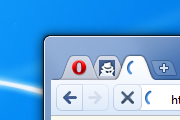
|Access tabs on top edge of screen|Speed Dial like Chrome's|Pin tab reduces the size of the tab|Chrome-ish buttons and iconsCUSTOMIZATION:Right click and select "Customize>Appearance ...
Description
|Access tabs on top edge of screen
|Speed Dial like Chrome's
|Pin tab reduces the size of the tab
|Chrome-ish buttons and icons
CUSTOMIZATION:
Right click and select "Customize>Appearance>Large Images":
- on the main menu icon to change it to an opera one;
- on the addressbar to separate it from the buttons next to it.
Note: You can drag around buttons in the addressbar by holding the Shift key.
UPDATES:
Updated in 2.0:
- Panel completely renewed with new buttons states and icons;
- Speed Dial also completely renewed;
- Attention colors of icons are now green;
- Tabs now behave better for different font sizes;
- Countless other changes, bugfixes and adjustments.
Updated in 2.02:
- Attention state of tabs now consists of a checkmark next to the favicon;
- Small changes in panel icons.
Updated in 2.05:
- Colorize fixes in tabs;
- Added another loading throbber (10x to @Penge);
- Search icon added back.
Updated in 2.10:
- Startbar now skinned;
- Tabs are no longer transparent and are colorized;
- Few other minor fixes.
Updated in 2.12:
- Pagebar and addressbar adjustments in alignment, padding and tab thumbnails;
- Speed Dial images are slightly larger.
Updated in 2.13:
- Menu button issues fixed, now the skin is usable in both 10.5x and 10.6x (provided you have clicked "images only" when customizing that area).
Updated in 2.14:
- Geolocation toolbar is yellow like the other toolbars, it also has a new icon (taken from chrome's geolocation toolbar);
- Speed Dial slightly more space efficient.
Screenshots
Comments (204 on the original page, latest shown)
Download
Works with Opera 7 or later.
About this skin
| Downloads | 1,196,620 |
|---|---|
| Version | 2 |
| Original page | Internet Archive |
All versions
- google_chrome_v2_14-2.zip 280 KB
Very good one.
very good! bravo!
не чё так
the skin is gr8 but fix the speed dial!
Cool that Opera promotes this skin. Not cool that it's not updated anymore.
Hello .. Nice skin , I use it because it reduces the size by compressing the pinned group ,, but it has a problem : once I want to choose a tab from a group, the preview disappears ,, Please fix this problem ,, Thanks
Nice skin! Please optimize this skin for Opera 11.50, Speed dial looks very bad in this skin. make speed dial look like this one http://my.opera.com/community/customize/skins/info/?id=11252
it's looks like the chrome really, even the "+" button xD
When use in Opera 11 and open bookmarks bar, the toolbar looks stranged. http://i.imgur.com/xUBJU.jpg
The menu button went wrong. It's not delicate at all. The menu button looks ugly and gets overlapped with the first tab. Also,when mouse move over the button, the small chrome icon is not good-looking and well-fitted at the corner.
Подпилите пожалуйста расстояние (см.рис), ибо в v1.1 grey всё вообще супер, но синий дисигн нравится больше.
everything is looking nice, except for menu button.
Nice!
hey good vwork ilike this skin so much
Add to favourites all your works and will watch for updates. Nice job.
Nice !!!
Nice !!!
ALEXANDER CAN YOU MAKE A SKIN SIMILAR WITH GOOGLE CHROME GLOW THEME CIAO
Super!
Please fix the menu icon in Opera 11