

Mirage Tango Fusion
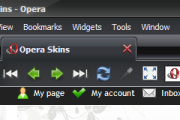
This is a fusion of Mirage and Tango skins. Mirage (id 6229) is created by Reinis Ivanovs and Tango CL (id 3465) is created by Tobias Wolf. Great works! 1.5* Optimized for size* Fixed ...
Description
This is a fusion of Mirage and Tango skins.
Mirage (id 6229) is created by Reinis Ivanovs and Tango CL (id 3465) is created by Tobias Wolf. Great works!
1.5
* Optimized for size
* Fixed some icons
1.6
* Incorporated zoquete's suggestion
Screenshots
Comments (33 on the original page, latest shown)
Download
Works with Opera 7 or later.
About this skin
| Downloads | 321,591 |
|---|---|
| Version | 1.6 |
| Original page | Internet Archive |
All versions
- mirage_tango_fusion-1_5.zip 358 KB
Oops, sorry wrong skin.
Home icon is not consistent with the skin.
I think the Stop button is horrible, but apart from that..... Great Skin.
best skin, thx a lot!!
Thanks for the skin, I love the speed dial background and the whole look of the skin. THANKS ONCE AGIAN!!! BEST SKIN EVA!!!!
Please add this section to skin.ini for Opera 9.5 [Edit Skin.mini] Clone= Edit Skin Padding Top= 0 Padding Bottom= 0 Margin Top= 0 Margin Bottom= 0 [Edit Skin.disabled.mini] Clone= Edit Skin.disabled Padding Top= 0 Padding Bottom= 0 Margin Top= 0 Margin Bottom= 0 [Dropdown Skin.mini] Clone= Dropdown Skin Padding Top= 2 Padding Bottom= 2 Margin Top= 0 Margin Bottom= 0 [Toolbar Button Skin.mini] Clone= Toolbar Button Skin Padding Top= 0 Padding Bottom= 0 [Toolbar Button Skin.hover.mini] Clone= Toolbar Button Skin.hover Padding Top= 0 Padding Bottom= 0 [Toolbar Button Skin.selected.mini] Clone= Toolbar Button Skin.selected Padding Top= 0 Padding Bottom= 0 [Toolbar Button Skin.pressed.mini] Clone= Toolbar Button Skin.pressed Padding Top= 0 Padding Bottom= 0
Best for my taste i've ever seen, great fusion... i just think the main toolbar back is too thick anyway, great skin, keep it up
Hi, Here's a quick fix for the button problem (black text on black buttons) Tools -> Preferences -> Advanced -> Content -> Style Options and untick "Enable Styling of forms" now your browser will use the text color of the skin.
The black text on buttons? Please refer to Reinis Ivanovs's site http://untu.ms/mirage/ for solution.
Looking good! I especially like those buttons that light up blue when cursor is over them.
its my favorite skin! there is one little problem with the text-color of the buttons. by example a submit button like here to write a comment. the text color is black on a darkgray button. sometimes I cant read the text on the button. if this could changed? or where and how can I change it myself?
I have 'em too:( Tobias, man, The Holy Creator of this skin, fix the black text in buttons right away, please! I'm goin' blind, just look at my avatar
That's really great skin, but am I the only one who has almost black buttons with black text (e.g. "Submit" button on this page)? Any way to fix it?
Zune theme for Windows and this skin are the best combination:)
This is nice.....real nice. Thanks!
This looks wonderful alongside my Ubuntu Studio theme.
blumoopy: damn, it did indeed work! thank you very much
Got to say I love this skin, after blumoopy's button-text-fix its perfect.
Hi codemole, yes there is a fix: Tools -> Preferences -> Advanced -> Content -> Style Options and untick "Enable Styling of forms" now your browser will use the text color of the skin.
Umm... is it just my setup, or was black text on dark form buttons intentional (f.e. the 'submit' button below)? Makes it very hard to read those Is there any way to fix it in the skin? Or maybe i need to change some settings myself for that matter? Thanks in advance for any help on this!