

Office 2003 Native
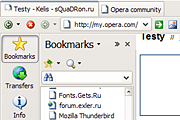
Opera 8.0 finally meets MS Office 2003. Minimalistic and efficient skin compatible with any visual style. Update for v8: start panel, voice icons, pagebar buttons... Report any bugs.
Description
Opera 8.0 finally meets MS Office 2003. Minimalistic and efficient skin compatible with any visual style. Update for v8: start panel, voice icons, pagebar buttons...
Report any bugs.
Screenshots
Comments (25 on the original page, latest shown)
Download
Works with Opera 7 or later.
About this skin
| Downloads | 237,873 |
|---|---|
| Original page | Internet Archive |
All versions
- office_2003_native-7_0.zip 64 KB
- Office 2003 Native.zip 57 KB
Tthanks for the nice skin. It solves the key issue I have with Opera's native skin -- I can see the active tab while using my laptop. Much appreciated!
Great, only 4 days after release... Good job, Mr. Anderson! I remarked new icons for bookmarks, FTW, Top10, speak, save, recycle bin... Nice, saves again some pixels
update Still my favorite, now the final is out... I'll hope you're online Best regards, Jensus
I don't use Office 2003, so I use this skin, instead...
I always search this skin down after a new install, I love the minimalist look and icons. Form buttons also look good, which is a major failing with alot of other skins
will be after stable release.
...for 7.6? Some Icons are not included, and i can't find a better one ... Best regards, Jensus
Simple and small icons! Very nice
Petrazickis, thanx for review! And yeah, Codename Opus 3.0 is а great XP style!
This is an absolutely fantastic skin. It's compact, native, visually attractive. It doesn't waste space without being cramped. It's small while still conveying everything that needs to be conveyed. (BTW, http://themes.belchfire.net/index.php?showtopic=8767 adds support for third-party Visual Styles to XP. I recommend http://www.deviantart.com/view/2744105/ and http://www.deviantart.com/view/9240396/ )
Thanks for update! One of my favourites!
to Drich You mean all that small avatars??? =:0
Looks clean ant icons stand out well. Good job I wish someone would come out with some new graphics for contacts in M2.
BTW, if you need mail icons be skinned in Office 2003 style too - just ask.
I downloaded the skin (recently) and I now have the mail icons I was missing before. Looks great!
#to BraytonAK# > The button bar in Office 2003 has an entirely different style to its buttons…> Actually, my skin is *native* – no styling on buttons, menus and tabs. That’s done deliberately. >I would love to see the main button bar (Back, Stop, Forward, etc) updated to really look like Office 2003>It is. You may be deceived by blue versions of “Back” and “Forward” – but it’s “Rewind” and “F.Forward”! “Stop” button was taken from Frontpage 2003 toolbar – I think this version is much clearer than “Stop” from default Office 2003 “Web panel” toolbar. > The Email, Bookmarks, Transfers and Address Book panels still use 7.50 buttons..> Nope. Only Email and Contacts use stock icons. Bookmarks, Transfers History, Info and Notes use new icons. #to MarcFou# > Other than a few missing icons in the mail panel (Received & Outbox)> Unfortunately I saw no other way to make menu items File->Import and File->Export without icons. #to sullysnet# >I like it alot but I hate the native look of the sidebar> I recommend using well-designed XP styles, for ex. Method, Togie, Metallic Shades and so on. #to Thalion# >you know, when there's this "large icons" checkbox in toolbar customization dialog which can be checked if one desires..> Office do not use new bitmaps for this option – it’s just 200% magnification. In Opera you can reach nearly the same effect by using option Skin->Size->200%. ##Sorry for formatting - it's opera.com "feature"##
... only the icons could be (optionally) bigger - you know, when there's this "large icons" checkbox in toolbar customization dialog which can be checked if one desires.
a non-native version of this I like it alot but I hate the native look of the sidebar. If you ever make one let me know I will test it out
Looks very nice. Other than a few missing icons in the mail panel (Received & Outbox) its great. Replace the IRC panel icon and a few misc. icons from Opera's skin and you'll have a real winner. Great job though. Looking forward to any updates.