

Omelion (Windows)
Omelion (Windows)- a revolutionized transparent skin - This is a feature complete, highly customizable, transparent, modern Opera skin with many new icons and clean design with attention to ...
Description
Omelion (Windows)- a revolutionized transparent skin -
This is a feature complete, highly customizable, transparent, modern Opera skin with many new icons and clean design with attention to high usability.
>>> This is the WINDOWS version <<<
:
> Linux release availabe
here
<
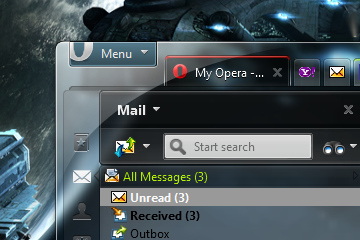
Screenshot (Windows 7)
(Omelion with new Opera Mail Panel and Omelion icons):
You'll find more screenshots of Omelion (Windows 7)
here
.
>>> SETUP <<<
:
1.
In the adressbar enter "
opera:config#UserPrefs|ColorListRowMode
" and set it to "
2
", to get rid of these stripes and press the save button at the bottom.
2.
If you own
WinXP
, I suggest you to switch to "
Windows XP style (Silver)
" desktop design mode, for now. Or use
Omelion with
Zune Theme
or
Royale Remixed
Windows Themes
. This way you get Omelion look like in the lower XP screenshot. (details at
Ticket 186
)
3.
If you don't like the default blue incoming Mail/Feeds color, just enter "
opera:config#Colors|Link
" in addressbar, change the "
Link
" section color code to e.g. "#202050" and press the save button at the bottom.
4.
If you don’t need scrollbars unset “
opera:config#UserPrefs|ShowScrollBars
” and scroll via holding “
Ctrl+Alt
” while holding left mouse down. Don’t forget to press the “
Save
” button in this section.
5.
If you want your upper tabs narrower at top window border, enter “
opera:config#UserPrefs|ChromeIntegrationDragArea
” in your addressbar and change the value (pixels) of “
ChromeIntegrationDragArea
” to e.g “
6
“. Don’t set it to low, otherwise you can’t move your window anymore! Now press “
Save
” button, if you changed this.
6.
Oh, and if you see white,
unreadable fonts
inside Opera Plugins like
Flash or PDF
. I have to say, this is NO skin issue. This is an Opera bug, which has been reported to Opera many times. Please report this bug
here
. We'll have to wait for it's fix.
7.
(optional) Use Opera Mail, I made many new icons and redesigned old ones, to get the best usability out of it.
8.
Go to
Omelion SETUP page
for more detailed setup instructions on transparency issues and many more and press the save button at the bottom.
9.
Read on here ...
How to get more contrast?
If you get to less contrast with Omelion, you have to play around with your Windows 7/Vista window color settings. Adjust windows color, hue, saturation, brightness, contrast and transparency settings. To get the best out of this combination, you have to practice a bit.
Use the following recommended settings. The lighter/darker your background is the more you have to move the sliders in their shown directions.
I use Omelion with light and dark backgrounds and I find ever a good setup. Needs some practice, but upper screenshot should help. I had really much work finding the best color design to let Omelion fit well in both environments.
Omelion with Windows XP
Zune Theme
or
Royale Remixed
:
You'll see more pictures of Omelion with custom Windows XP Themes
here
.
Please don't vote the skin down, if you have problems in finding the best Windows settings. Better ask for help or open a
Support Ticket
and post your problem and attach your wallpaper, Opera Version and OS, thanks.
BUG REPORTS and FEATURE REQUESTS
Please report your request
here
Changelog
NEW
Version 0.9.8.7
[28] (not availabe)
Version 0.9.8.6
[27] (not availabe)
Version 0.9.8.5
[26]
Version 0.9.8.4
[25]
Version 0.9.8.3
[24]
Version 0.9.8.2b
[23]
Version 0.9.8.2a
[22]
Version 0.9.8.2
[21]
Version 0.9.8.1
[20]
Version 0.9.8.0
[19]
Version 0.9.7.9
[18]
Version 0.9.7.8
[17]
Version 0.9.7.7
[16]
Version 0.9.7.6
[15]
Version 0.9.7.5
[14]
Version 0.9.7.4
[13]
Version 0.9.7.3
[12]
Version 0.9.7.2
[11]
Version 0.9.7.1
[10]
Version 0.9.7.0
[9]
Version 0.9.6.8
[8]
Version 0.9.6.7
[7]
Version 0.9.6.6
[6]
Version 0.9.6.5
[5]
Version 0.9.6.4
[4]
Version 0.9.6.3
[3]
Version 0.9.6.2
[2]
Version 0.9.6.0
[1]
Don't forget to read the upper >>> SETUP <<< instructions.
There are many hints, tips & tricks to get the most out of Omelion.
STAY TUNED!
Updates will be advised here
(recommended)
Omelion at Twitter
Omelion Site News
Development News
Follow Omelion at
Twitter
License
Creative Commons License
3.0
Screenshots
Comments (221 on the original page, latest shown)
Download
Works with Opera 7 or later.
About this skin
| Downloads | 4,328,886 |
|---|---|
| Version | 0.9.8.7 |
| Original page | Internet Archive |
Originally posted by Dan: Is there an updated version for 11.62 somewhere ? If you mean the Windows version I have to say, sorry, not even on my drive. If you mean the Linux version. It's heavily in development I don't have Windows anymore and I'm focusing on a new Linux version first. Yes a Windows version is coming, too. It's just that I'm no more able to develop a Windows version. Just follow #Omelion on twitter.
Is there an updated version for 11.62 somewhere ?
Omelion 0.9 8.7 is great. Have one problem: The first letter of the top toolbar (File-Edit-View, &c) is over-written with another letter. This only happens to the first letter, like the F for File, E for Edit, &c. Other than that I am delighted with your Omelion skin. By the way I have Windows 7
I'm not sure if you've quit working on this skin (been a while since last update, and domain is parked), but if you're still updating, it would be nice if you could skin the buttons that appear when you disable "Show close button on each tab". (Preferences > Tabs > Additional tab options...) Also, if you do update it, could you repost a quick pointer/guide on how to manually change status text (link field?) from black to white, as it's the main reason I've been sticking to 0.9.8.6 BETA 2.
When I select options form panels or menus (let say I click Received) it changes background behind caption to white. If I change omelion to other skin and then change it back to omelion it works... until exit. When I start Opera again it's white background again. http://i51.tinypic.com/2ep6hrb.jpg I have such problem! How can I fix it?
thx very beautiful =) i like the words "find" and "ext" separating the search bar and extension bar
Please could you help. My Omelion won't go transparent! Please help or tell me what to do. Do you need any special graphics requirements? Ty.
This looks great!
Thanks for update!
your skin and the z1 glass are MASTERPIECE =D
Let me just say how amazing this skin is! Thank you for all your hard work! Can't wait for v 1.0
When I select options form panels or menus (let say I click Received) it changes background behind caption to white. If I change omelion to other skin and then change it back to omelion it works... until exit. When I start Opera again it's white background again. http://i51.tinypic.com/2ep6hrb.jpg
Pls help me with doing an own skin i have problems with everything.
Originally posted by operaton: you see those buttons there upside left? those "cookies, plugins, proxy" things; if you add something (such as a color) which indicates the status of them if they're enabled or not, that would make this skin even better. Good hint. But please use the Ticket system as written in the SETUP description and attach the screenshot there. This way I don't forget it .) Originally posted by brodie1600: Please fix the transparency issues (with Youtube or any panels/images/backgrounds that don't have an assigned color (transparent)) If you mean the Flash transparency problems you probably not have read the SETUP section. It's a Flash/Opera bug has nothing to do with the skin. But thanks for your help.
Please fix the transparency issues (with Youtube or any panels/images/backgrounds that don't have an assigned color (transparent)). It gets really irritating when I'm trying to see certain things in transparent menu bars (such as Youtube or Pogo). Other than that, this theme is the best I've come across. Nice design, and keep up the great updates!
really cool stuff
This is a very great skin! Is it possible to change menu bar's and the mail panel's background color? Windows Xp's blue is very ugly, and I don't have rights to change it.
this skin is really the greatest skin i'v ever used in these years! keep up the good work *5/5* screenshot : http://hoborg.persiangig.com/Files/Pictures/Opera/1-23-2011%209-25-03%20PM.jpg you see those buttons there upside left? those "cookies, plugins, proxy" things; if you add something (such as a color) which indicates the status of them if they're enabled or not, that would make this skin even better. anyway this skin's really great and i really like it. it's now about 2 or 3 months i'm using this skin and it doesn't bore me or make me tired even for a second! it's just awesome! thanx for the great work
thankz.....great:D
Amazing skin, keep up da good work!