

opera 9.5 small with vista black
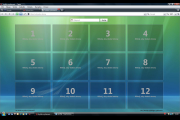
For laptop 1440 x 900. Tabs small,speeddial-vista system.
Description
For laptop 1440 x 900. Tabs small,speeddial-vista system.
Screenshots
Comments (25 on the original page, latest shown)
Download
Works with Opera 7 or later.
About this skin
| Downloads | 1,139,074 |
|---|---|
| Version | 0.1 |
| Original page | Internet Archive |
THANK YOU I DID IT!!!
Does those More Speed Dial boxes work on Opera 9.63? i've tried on top, on the bottom, in the midle and it doesent work
Version 0.2, which is waiting for approval operates correctly opera 10 alpha.
This is...beautiful. Any chance of a Opera 10 Alpha compatible version?
Nice improvement of default skin (thinner tab pane and new background of speeddial). However, some icons from default skin are missing and you need to add them manually. Similar skin is Mironix Light ( http://my.opera.com/community/customize/skins/info/?id=8321 ).
Max 7x9
How did you make the opera standard skin smaller. I'm trying to make my own skin and I can't figure out how to make the standard skin smaller. HELP!!!!!!
I only wish I had the same dam setup but I only find, speeddiale_default.ini and this is what it has in the file any takers Opera Preferences version 2.1 ; Do not edit this file while Opera is running ; This file is stored in UTF-8 encoding [Speed Dial 1] Title= http://redir.opera.com/speeddials/?id=1 Url= http://redir.opera.com/speeddials/?id=1 Reload Enabled=0 Reload Interval=0 Reload Only If Expired=0 Funny or have I missed something if it helps my subnet only has 4 ips 2 from holland, 1 usa-wdc, 1 london, just I read other opera help and they explain stuff on, only 4 in my bed I thought all home PCs were like servers for the web, like an extention for your ISP ? thanks if any later dudes
great work! really luv this skin! BUT the tabs and the other panels aren't really small as! would be very nice if it was smaller. maybe lke the "breeze_simplified_micro_v4_21c-4_21c" skin! i tried to midifie it myself and uploaded it! maybe it works! if you have a hint or something telle me! thank you!
shit...not working
C:\Documents and Settings\.......lama......\Data aplikací\Opera\Opera\profile\speeddial.ini . . . . Reload Interval=0 Reload Only If Expired=0 Rows=4 Columns=5
Oops, typo... [ Size ] Rows=4 Columns=5 (Be sure to take out spaces)
For more than 9 (or less than) Speed Dial boxes: 1. Instead of a website go to: opera:config 2. Check the box that says Show All 3. Type in: speeddial 4. Click: Choose 5. Find speeddial.ini 6. Right click and open 7. Close Opera 8. At the top add in: Rows=4 Clolumns=5 Thats for 20, feel free to tweak it. -Jon
had the same trouble of finding the ini file... to find it type 'about:opera' to address bar in you opera and it will tell you where your preferences folder is
"Open speeddial.ini file in your Opera's preferences directory." Cool, ok, sorry to sound like a retard, but could someone tell me where this is/how can I find it? I don't really know what I'm doing, so any nice honest advice would be kindly appreciated. All I want is the 3x4 speed dial, Cheers
Rows=3 Columns=4 So it should be!!!
Open speeddial.ini file in your Opera's preferences directory. In this file you should add this text: Rows=3 Columns=4 You can adjust this values, of course. Note, that Opera must be closed during editing this file. Then, after runnig Opera again, open your SpeedDial & have fun. Good luck!
How to make more then 9 sites in start screen?
fuck you
fuck off