

Opera 9 Standard Skin for 10.50
Variation of "Opera 9 Standard Skin for 10.50 #chrome" without "Chrome tab integration"Full description
Description
Variation of "Opera 9 Standard Skin for 10.50 #chrome" without "Chrome tab integration"
Full description in chrome variation page
Screenshots
Comments (27 on the original page, latest shown)
Download
Works with Opera 7 or later.
About this skin
| Downloads | 81,269 |
|---|---|
| Version | 1 |
| Original page | Internet Archive |
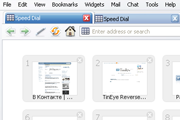
Speed dial doesn't look good, but everythig else is acceptable.
This is definitely my favorite skin for Opera. Unfortunately, the menu bar in completely messed up in Opera's latest version. Could you please fix it for 11.60?
the best skin!
huhu i ve been left back dated..
please update for opera 11
This is best clean theme in all time.
please update to opera 10.70
In [Dialog Skin], Text Color should be #ffffff instead of #000000 think. Now the text "Do not show this dialog again" is black but it should be white.
Thanks very much
Great skin. It about represents Opera 9's to about 99%. Without #chrome is much closer but when trying to show the menu bar, there's a un-pleasant line under it. Other than that, great skin once again.
Hi again! Do you think you can fix the style of the "Downloading file" dialog to the classic one? I mean like this: http://pici.se/pictures/dJguFKSxV.png And also, the text that is sometimes shown at bottom left outside the grey area is black but it should be white.
Originally posted by lbs129: The status bar issue is the only thing that makes me stay with Opera 10.10 You can use the "Zoom button" from 10.10 (it work normal) 1. Click mouse right button to modern zoom selector → Customize → Remove from toolbar. 2. Shift+F12 → "Buttons" tab → "Browser view" category → Drag&drop classic zoom selector to status bar. Press OK Added: oops, old Zoom selector is big too. So you can darg&drop 'zoom slider': ---[]------
lbs129, the reason of the big paddings: All buttons in status bar use the [Statusbar Button Skin] settings without "Turbo button" and "Zoom Button". "Turbo button" using specially [Web turbo mode*] settings. "Zoom Button" using settings from [Toolbar button skin] — I don't know why Opera developers invented it.
Originally posted by metude: What diffrences with this and #chrome... You can see the difference if you will hide menu bar, main bar and personal bar (in WinXP, WinVista or Win7).
Nice one!
Thanx... What diffrences with this and #chrome...
If you look at this skin, the status bar height is correct even when the zoom button is there: http://my.opera.com/community/customize/skins/info/?id=7298 Maybe you can use the same method as he did to fix it? By the way, it looks like there is a little bit too much padding below the address bar. It looks like the bottom padding is bigger than the top padding. Thank you very much for making this skin! The status bar issue is the only thing that makes me stay with Opera 10.10.
Originally posted by AntonDiaz: Look at the link in the skin description Thank you very much for that.
Originally posted by lemeshev: blue tabs are too blue (up to the point of distraction) imho. This skin only repeat the standard skin of Opera 9 =)
Originally posted by Pantaz: Thanks for putting together this skin. The only problem I'm having is the Password Manager prompt is blank (the toolbar that pops-up to ask if you want to save a site's login/password). I see normal Password Menager panels (not blank). What the Opera version? Originally posted by pieRr0Ur: I hope, there'll be a modified version w/o the title bar Look at the link in the skin description