

Opera Classic Fixed
Opera Classic Skin for Opera 10 with some changes to represent classic Opera style :)Changes since Opera 9 Classic Skin (http://my.opera.com/community/customize/skins/info/?id=8085):* Clas ...
Description
Opera Classic Skin for Opera 10 with some changes to represent classic Opera style :)
Changes since Opera 9 Classic Skin (http://my.opera.com/community/customize/skins/info/?id=8085):
* Classically small pagebar and big addressbar :)
* Fixed addressbar and toolbar buttons visualization
* Fixed search panel position
* New button-like thumbnails
* Flat drag scrollbar
* Opera 10.00 beta 3 support!
* Opera Skins version 3 support!
Opera release compatibility fixes:
* Pagebar tail buttons fixed
* Pagebar floating buttons fixed
* Mail background fixed
* Mail Compose Separator fixed
* Buttons on thumbnail panels fixed
* Main bar buttons visualization fixed
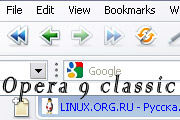
Screenshots
Comments (34 on the original page, latest shown)
Download
This file has not been recovered yet. Do you have a copy? Tell us.
About this skin
| Downloads | 30,424 |
|---|---|
| Version | 0.9 for 10.00 |
| Original page | Internet Archive |
В классическом стиле для девяток и десяток, предложенном здесь, (и во всех подобных) на активном табе появляется некрасивый выступ снизу-справа, если вкладок достаточно много. У Вас это тоже есть (правда, у Вас активный таб не поднимается (зря, мне кажется) над остальными, поэтому чуть менее заметно. Раз уж разобрались в устройстве скина, попытайтесь исправить, пожалуйста: http://s003.radikal.ru/i202/1001/d2/7ca53ccb8b26.png (и сам активный таб сделать бы такой же ширины, как остальные)
Love it! But is it possible to prevent the overlay of the "new tab" button and "closed tabs" in the upper right corner that occur when you have filled the tab bar?
Originally posted by abraca-pocus: btw here's some kinda bug http://s19.radikal.ru/i192/0910/e4/f59dca42d3eb.jpg надобы исправить, очень не удобно!!! hath need of remedy, it is not convenient http://s54.radikal.ru/i143/0911/ee/2f0b16246e15.png
btw here's some kinda bug http://s19.radikal.ru/i192/0910/e4/f59dca42d3eb.jpg cheers.
woah! this one is really great. i think it would be better if u make panels a bit thinner or maybe remove drag bar between 'em. many thanks!
Could you look into the details of the currently active tab? In previous versions of Opera it's raised by a pixel or two compared to the other tabs. Also, when you open the appearance or the preferences dialog, it appears to be a small glitch between the first tab and the content panel. They are not aligned. Thanks for the effort you've put in making this skin
Originally posted by Sаdlеr: > The trash button does not switch to inactive after I clear the list of closed tabs. Another undocumented button I think . Really annoying. I think, it is a global problem, because I've tried the new default skin, and it gives the same bug(?). Anyway, thanks for the update!
Fantastic version! look great! pd: please use a "yellow glow" or make a "yellow glow" version.. like the old times ^^ thanks again!
¡Excelente! Muchas gracias. Me gusta este skin. ;-)
A must have!
new tab icon is behind the trash
Fix the Drag Scrollbar Skin.
Actually, the weird line is only there if one chooses no HTML formatting when composing message. If HTML formatting is chosen, the background colour of the formatting panel doesn't fit the rest. The line probably takes the colour of the HTML panel background.
I meant the line that separates the left panel from the main page.
Great, but still when composing message, the line between the subject field and the message field looks a bit weird. Also the line that separates the left panel (when it's open) extends a bit to the tabs. But all this is also the case for Peter Nilsen's skin. Otherwise, it's brilliant. Thanks
> New tab icon on tabs bar appears wrong. Fixed in 0.8. > The colour of the background of the mail menu panel (Compose - Reply - Reply All - Forward - Read etc.) doesn't fit. Also fixed. > Also, when you're in the unread mail section and click on the white space with no e-mail, it tells you, "No message selected," with background which doesn't fit either. I think, that's undocumented skin-panel, I can't find it in opera skinning documentation. > The trash button does not switch to inactive after I clear the list of closed tabs. Another undocumented button I think . Really annoying. > The overall performance with this skin seems slower (scrolling is a bit jerky).No problems with Nilsen's skin. Because I use Opera Skins v.3 (for further compatibility with new versions of Opera). > The fonts in the tabs are not centered It's not centered in my Opera 9.6 with Peter Nilsen's Classic skin. Excuse me. > The scrollbars highlighting color on mouseover should be yellow (as in the good old Opera 9 skin) I have no so old Opera to see what color must be scrollbars, it is not very annoying thing. Moreover, it's more style-integrity to stay it purple.
The colour of the background of the mail menu panel (Compose - Reply - Reply All - Forward - Read etc.) doesn't fit. Also, when you're in the unread mail section and click on the white space with no e-mail, it tells you, "No message selected," with background which doesn't fit either. Otherwise great, thanks.
Thank you. I will fix some errors today or tomorrow.
>>New tab icon on tabs bar appears wrong. >Screenshot, please I've got the same problem... did send you a PM Sadler.
strange but why that there is not a correction of the button " to create an inset " (Ctrl+T) an extensible bar is not needed between insets and address line