

Phoenity
This skin is no longer maintained (last updated for Opera 9.5).Want to adopt it? See http://my.opera.com/larskl/blog/2010/01/31/adopt-a-skin for more info This Opera skin is based on the ...
Description
This skin is no longer maintained (last updated for Opera 9.5).
Want to adopt it? See
http://my.opera.com/larskl/blog/2010/01/31/adopt-a-skin
for more info
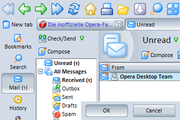
This Opera skin is based on the Pheonity iconset by Lim Chee Aun. Phoenity icons distinguish themself by the clear outlines and consistent colors.
All icons are easy to recgonize, making it easy to use Opera with this skin.
Backgrounds, dialogs and button-backgrounds are blue-grey colored which enables the user to keep his focus on the page as opposed to on the user interface.
This skin also includes a number of additional icons not found in the standard skin. Those can be used in custom menus and toolbars.
There's 3 versions of this skin available:
Phoenity New
(recommended)
Phoenity
(classic buttons)
Phoenity Native
(native version, operating systems backgrounds and buttons)
See my site for
complete changelog and more information.
Screenshots
Comments (24 on the original page, latest shown)
Download
Works with Opera 7 or later.
About this skin
| Downloads | 697,303 |
|---|---|
| Version | 4 |
| Original page | Internet Archive |
All versions
- phoenity-4.zip 958 KB
- phoenity-8_0.zip 563 KB
- Phoenity.zip 556 KB
- [email protected] 554 KB
- Phoenity 2.8.zip 279 KB
Remember: this is for firefox, Too!!!
The Best One!!!
Good that the skin is updated to Opera 9.5. This is my preferred skin. There is one image, however, that has not been updated since Opera 7: the "Welcome window" background image. Not a big deal, but would be nice to not have the number 7 on that window.
Will we be able to see an updated version of the native skin?
This theme for firefox or opera has been my favourite one for years. Looks good and smooth.
I love this skin. Been using "blue B for v8" for about a year - time for a change. This skin is quite intuitive and vibrant. FIVE STARS! :-)
Little bug: Right click on the one of refresh, fast forward... icons and choose customize. Then put a tick on "Larg images". Then click OK. Now, when you click refresh button, the URL in the address bar moves to right to left... One suggestion: Please change the smilies, i think they'r uggly
Nice skin, given 5 stars
I love this skin, my favourite thing is the ability to close window clicking the red cross on the tab
Yeah.....really it is the best opera skin...that i ever download...it is generate beautifull opera interface...thanks larsKl for such kind of work...keep it up. thanks.....
This is the the best Opera skin to me. It's easy, simple and intuitive, it looks pretty, a real good example of usability and appereance. Thank you for sharing it!
tolle arbeit lars.respekt :-)
I only miss the new Opera 8 icons. This skin has not been updated yet to Opera 8.
i used to use the fauxstoon series, but for a while now i've been using phoenity. i have yet to see phoenity redux, though. what i like hte most abou this skin is the height restriction for favicons in the personal bar. other skins will stretch some favicons out disproportionately, while phoenity keeps them constricted. a big thumbs up, i have yet to find a skin i would rather use. . .
Works amazingly well for Linux with special effects off. Everything looks big enough to hit with every try.
I didn’t know that ‘Panels’ have their own style ‘Large Images’. As soon as I turned it off all looks much better. Great skin
Thanks. They're both much better now
> Ok, there is Phoeity Redux and just Phoeity. The claim that all icons in latest 'just' Phoeity have small and large versions is not true. Example - panel icons 'Bookmarks' and 'History'. In Phoeity Redux those icons are small, in 'just' - large, and they do not change This does not look good.. There are small and large versions for every icon. Phoenity Redux is by another author and I can't influence it. In my skin you can change the icons size by en-/disabling "Large images" in toolbars options. > I like your skin a lot, but was shocked when I saw what you did to the drop down arrows They're the standard arrows in Native version which is designed to look as native as possible. > Have a look at your little screenshot and focus your eyes at the arrows beside "Mail". They all seem to look the same, especially the last two. I changed the panel maximize/close buttons right now.
I like your skin a lot, but was shocked when I saw what you did to the drop down arrows (the small arrows beside e.g. the "back", "forward" and "show images" buttons). They may be "good looking". But they are horrible from a usabilty point of view. It's only clear after a second look that they actually point downwards. Then their functionality is not at all obvious as opposed to the omnipresent small black down arrow usually used. People know the black version, people know what it does, people expect it. Have a look at your little screenshot and focus your eyes at the arrows beside "Mail". They all seem to look the same, especially the last two. In your previous versions you used the small black arrows, please consider reintroducing them. Choose usability instead of eye-candy.