

PlastikOpera-SUSE
Plastik style and Crystal icons from KDE-HiCrystal (thanks to SoeDib and Cohelo), SUSE 10.0 KDE color theme. If you use default KDE colors you may prefer PlastikOpera. Changelog in m ...
Description
Plastik style and Crystal icons from KDE-HiCrystal (thanks to SoeDib and Cohelo), SUSE 10.0 KDE color theme.
If you use default KDE colors you may prefer PlastikOpera.
Changelog in my user page.
Screenshots
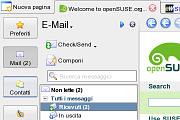
Comments (14 on the original page, latest shown)
Download
Works with Opera 7 or later.
About this skin
| Downloads | 164,430 |
|---|---|
| Version | 1.15 |
| Original page | Internet Archive |
All versions
- plastikopera-suse-1_15.zip 419 KB
Well there is a clear button in 8.5, not default but it's in customize->buttons->browser view. Thanks for adding the icon in 1.13 by the way
Of course I can, there is no "clear" button in Opera 8.5, will it be added in 9.0?
Hi there, Thanks for a good skin, could you please add the locationbar_erase.png to the clear button, that would be lovely.
Hello. Love the theme Only "flaw" compared to konqueror is that konqueror right mouse click menu has smaller icons.
Thank you very much for making this skin, I've been looking for it ever since I found plastik.. Really good job
I prefer the sister skin slightly, but it is still unspeakably sweet. Great job.
I meant the pagebar tabs. Try adding [Pagebar Skin] Text Color = #000000 or FF0000 for debugging (reload all pages command is useful for that particular purpose when multiple tabs are open). Adding this line fixed it for me. M.
If you are speaking about the tab button in the pagebar it's supposed to be bright blue (#0000ff): it is indeed blue on my PC. Regarding normal tabs (eg in Appearence window) I have never see one of them in the .attention state. Anyway I'll fix it as soon as I find out what's wrong. Many thanks.
Very nice - really. I find it strange though that '.attention' state for tabs produces white text (unreadable for default plastik theme colors in kde). It's trivial to fix though. M.
Yup, thanks - I did that modification already
I'm not sure about using fixed tab width. It is a real minor modification in the skin, so you can do it yourself if you wish. You have to open the PlastikOpera-SUSE.zip file and modify the skin.ini file included. At lines 20 and 21 just set "Pagebar max button width" equal to "Pagebar min button width" (I think 150 is a good choice).
My apologies for bad wording: I have tabs wrapping to several lines, and "fixed tab width" (constant) make sure the UI doesn't look like a big mess /c
I can't understand if "fixed" means "constant" or "correctly working" in your sentence, and what's wrong with the tab? Many thanks
Nice, good job. Now a version with fixed tab width would be very nice... /c