

Shadowguard
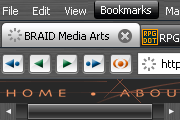
Dark, compact skin with sharp and clear icons. Changes: tabs are switched (light<->dark), scrollbar, hotpanel icons, mail headers...
Description
Dark, compact skin with sharp and clear icons.
Changes: tabs are switched (light<->dark), scrollbar, hotpanel icons, mail headers...
Screenshots
Comments (154 on the original page, latest shown)
Download
Works with Opera 7 or later.
About this skin
| Downloads | 2,082,237 |
|---|---|
| Version | 1.1 |
| Original page | Internet Archive |
All versions
- shadowguard-1_1.zip 590 KB
This is a great skin and I have been using it for a couple of years, but it needs to be updated for 10.62 The tops of the buttons on the toolbar are cut off.
Actually... I've adapted this skin to my needs. I tried to fix the other things too. That means I added some of the entries of the newer Opera to this skins ini and made it look like the original Shadowguard. Here is a link to the skin I've uploaded: http://my.opera.com/community/customize/skins/author/?id=coolTibi There are 2 skins uploaded, but it should be the same one. I just didn't figure out how to delete one of them. You're welcome to test it and eventually write me a comment. Enjoy!
A little fix, that can help you with the white background of the tabs under Appearance settings. In the file c:\Program Files\Opera\profile\skin\shadowguard-1_1.zip\skin.ini add the following 2 lines: [Dialog Tab Page Skin] Clone = Dialog Page Skin You can place it almost wherever in the file, but i would suggest to paste it after the [Dialog Page Skin] paragraph just for transparency. There are obviously more fixes to do, but this saved my day for now.
Originally posted by zoquete: I made a remake of this beautiful skin, check it please: http://my.opera.com/community/customize/skins/info/?id=8943 Appreciate the effort but it's not nearly as nice. The fonts are larger, it's lighter, it doesn't have the clarity and definition of Shadowguard.
I've been using this skin for years and it is THE ONLY skin I like. Could you please consider doing an upgrade so it will work properly on the new Opera versions? If I upgrade past 10.10, all the preferences, etc., are whited out and the skin cannot be used. I'd even be willing to pay for it. Please!!!
Originally posted by drbmbay: yes please. make 10.5 version. yes, it apperas cant't works on winxp. I don't have vista or 7, but it works fine on win2k!!!
Best.
yes please. make 10.5 version.
Yes, it is not compatible with 10.50 final either.
could you please make it compatible with Opera 10.50 Beta
I made a remake of this beautiful skin, check it please: http://my.opera.com/community/customize/skins/info/?id=8943
I'll let you in on a little secret: Shadowguard looks GREAT with OP 10.00 Beta 2 on my Mac!
Will there be any update for Opera 9.6/10?
Absolutely the best. Compared with many other. Perfect.
Nice layout, and one of the best that I've used. But one issue. I've noticed that on the speed dial page, the 'sync opera, customize speed dial' etc... buttons are hidden
I agree with zytozid. This is the best Opera Skin that's around, but it's a shame how the Feed/Mail looks broken with the latest (>4345) build. Hope it'll get fixed soon, I'm actually still using it, because there's nothing like this around to change it with
I agree with zytozid. This is the best Opera Skin that's around, but it's a shame how the Feed/Mail looks broken with the latest (>4345) build. Hope it'll get fixed soon, I'm actually still using it, because there's nothing like this around to change it with ;)
I agree with zytozid. This is the best Opera Skin that's around, but it's a shame how the Feed/Mail looks broken with the latest (>4345) build. Hope it'll get fixed soon, I'm actually still using it, because there's nothing like this around to change it with ;)
would be great if someone could make a new version compatible to opera 10(beta).
Did you have a new version from the 9.5o version? It's a nice skin to use.