

Bookmarks
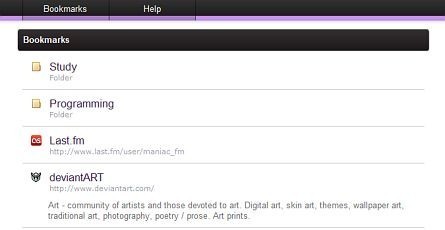
Share your Opera bookmarks with friends everywhere.
Description
The Bookmarks service allows you to share your Opera bookmarks with your friends. To set up the application, install it and follow these instructions:
Go to
Help → About Opera
and copy the path to a folder where your bookmarks are stored
(e.g. C:/Users/%username%/AppData/Roaming/Opera/Opera/)
Open
Unite Panel
, right-click
Bookmarks
and select
Properties…
Paste the path you copied into the input field
Voila!
Now your friends can access your bookmarks and even subscribe to the updates via Atom Feed so they would know about interesting web-sites you liked as soon as you bookmarked them in your browser.
Changelog:
v.1.2.1
Fixed: Broken archive was making application invisible for Unite
v.1.2
Fixed: Opera 10.50 compatibility
Added: Opera 10.50 Unite functionality (shoutbox, hints, etc.)
v.1.1
Fixed: Unite Home errors caused by custom Atom Feed
Fixed: Nonsupport of non-latin characters in the folders names
Screenshots
Download
Works with Opera 10.10 to Opera 12.
About this Unite application
| Downloads | 21,771 |
|---|---|
| Version | 1.4 |
| Size | 354KB |
| Last update | November 17, 2011 |
| Awards | Weekly Winner |
| Original page | Internet Archive |
All versions
- Bookmarks_632_1.4.ua 354 KB