

Opera Action Manager
Edit Opera's Custom Actions easily, Manage Toolbar.ini or Menu.ini, Keyboard.ini, Mouse.ini and Share it with everyone.
Description
This application shares the configuration file by default. Please make it to "Unshare" when you do not want to open it to the public. Moreover, please do not up-load files other than toolbar.ini/menu.ini/mouse.ini/keyboard.ini.
OperaActionManager is an Opera Unite Application to edit and manage the navigation setting files - toolbar.ini, menu.ini, mouse.ini, keyboard.ini, skin.ini.
Information
Change Log
Download Development Versions
Users Forum
Questions and Tutorials
Requests and Ideas
Report Issues
Translations
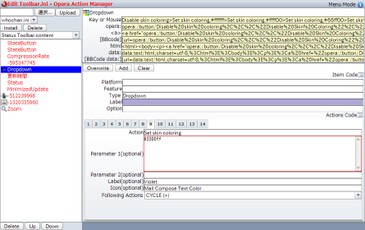
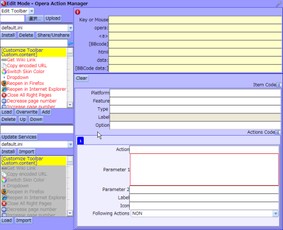
Select the type of UI:"Toolbar" or "Menu" or "keyboard" or "mouse" by left-to form.
Upload your setup file to the Opera Action Manager Server.
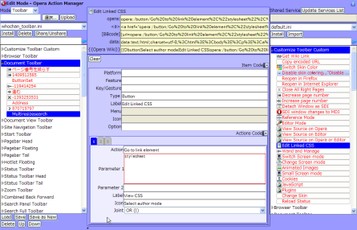
Choose a file to edit(left pain),and a file to sample(right pain) from list.
Load a item from right pain, or select the type of item.
Edit lavel and more...
Edit code of action.
Save it to left pain.
Install edited setup file.
In Mouse Mode
Input Gestures by keyboard.
GestureLeft,GestureUp,GestureRight,GestureDown as Left,Up,Right,Down.
Buttons as F1-F12.
FlipBack as Home.
FlipFoward as End.
Screenshots
Download
Works with Opera 10.10 to Opera 12.
About this Unite application
| Downloads | 220,371 |
|---|---|
| Version | 5.5 |
| Size | 237KB |
| Last update | March 9, 2011 |
| Original page | Internet Archive |
All versions
- Opera Action Manager_651_5.5.ua 237 KB
- Opera Action Manager_651_5.3.ua 242 KB
- Opera Action Manager_651_5.1.ua 236 KB
- Opera Action Manager_651_5.0.ua 236 KB
- Opera Action Manager_651_4.0.ua 158 KB
- Opera Action Manager_651_3.0.ua 160 KB
- Opera Action Manager_651_2.0.ua 152 KB
- Opera Action Manager_651_1.0.ua 104 KB