
Add-ons › Widgets › Social Websites

Blue Stars
The widget is designed to help members of the Blue Star Favorites group create their photo "tag" comments and to provide them with a template for the daily blog posts.
Description
Information
Please see the
detailed instructions
on its use. There is a dedicated
forum thread
for QnA, support, comments, suggestions.
In a nutshell
Type a username or paste a photo album URL in the widget's textfield, and press ENTER. The widget will accept:
the URL of a photo inside a MyOpera album, ending in the picture number; e.g.
http://my.opera.com/prakie/albums/showpic.dml?album=139667&picture=2010742
a MyOpera username e.g. "dantesoft", "DanTeSOFT", "EL%20KALLE", "El Kalle" (without the quotes)
Please provide feedback in the dedicated
forum thread
.
Features
Checks whether the user is a BSF member or not
Autogenerates the photo comment (blue star tag)
Autogenerates a blog entry template
Rejects spurious links to thumbnails
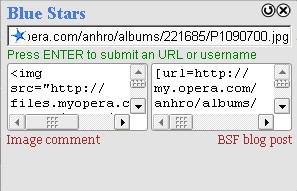
Screenshots
Comments (10 on the original page, latest shown)
Download
Works with Opera 9 to Opera 12.
About this widget
| Downloads | 1,287 |
|---|---|
| Category | Social Websites |
| Version | 1.7 |
| Size | 26KB |
| Last update | January 21, 2009 |
| Devices | desktop |
| Original page | Internet Archive |
A tremendous help to the group and makes the process so much easier of knowing who is a Blue Star member (thereby allowing us not to accidentally tag a fellow member) templates for Image Comment on the person who we are tagging and the BSF blog post. Just copy and paste! Fantastic! A big round of applause to Dantesoft for a major contribution to the group. Regards, Andy
Thank you. Sorry I'm new to Widgets. I just need to understand how to get it to show like the photo of it above. I guess I need to add all the members of Blue Star on my widget to look like that.
No, the widget will fetch the list automatically. To test, type "Dacotah" without the quotes on the input box, and press enter. To use the widget, you would paste in the input box an interesting image address, as it appears in its MyOpera album. Let's assume you arrive at http://my.opera.com/prakie/albums/showpic.dml?album=139667&picture=2010742 and want to make sure you can Blue Star the photo (maybe also make it a daily favourite). Press F8, CTRL+C (this will copy the URL in the clipboard), then go to the widget window, and paste it in the input text box: CTRL+V, then press ENTER. You should now have something similar to the screenshot: two textareas, ready to copy-paste as a comment in that users's photo album, and as a post on our group blog, respectively. Also note that you will get a "User is a BSF member" message, should this be the case for the photo's author, e.g. if one tries to add a Blue Star to http://my.opera.com/Dacotah/albums/showpic.dml?album=208015&picture=3131650
Thank you. Sorry for not understanding. I'll I see on mine is: BLUE STARS The Image page address from its album bar I clicked the Download button & that's what I got, just the top part.
Yeah, maybe I'll put a piece of text with quick instructions for the next version. That "Image page address from its album bar" should go away once you focus on the textbox (click or TAB).
Excellent! I think this is a timely piece of software, since our membership is growing by the day. Cheers!
The widget did not do so well on this image http://my.opera.com/Nowak%20Ryszard/albums/showpic.dml?album=262519&picture=3881423 A thumbnail was not generated (did not show) and the link went to the info page rather than the image page.
The %20 in the username makes it not see the album thumbnails. For now, please use "http://my.opera.com/Nowak Ryszard/albums/showpic.dml?album=262519&picture=3881423" Will investigate further and hopefully have a fix today. Thanks! Update: Please download the latest version.
I would need to download Opera 9 for Windows...and I can't. I am running on an older version of Opera..and I am ok with that for now. My computer is old too. Anyhow..I will do all this new stuff when I get a better computer.
Just downloaded. Looks good! Thanks. And Ducky... you shouldn't have any resource problems with Opera 9. Plus it's more secure (various updates etc).