
Add-ons › Widgets › Web Developer

Character Map 1.7
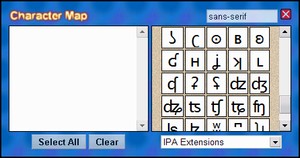
A simple widget to find and select various typographic characters.
Description
Select the character set you would like, then click on the specific characters you would like. This puts them onto the text field where they can be easily copied. There is a font selection box that allows you to type in the specific font you would like to preview.
Run in Browser
Subscribe for updates
Changes in 1.1 (1.2? I can't keep up with the new widget system):
The font selection box at the top now affects the font of the text box as well.
Small selection bug fixed.
Changes in 1.3:
Fixed spelling error.
Changes in 1.4:
Changed initial dimensions of widget to enhance performance.
Changes in 1.5:
Character Map now remembers the characters you've selected, as well as your currently selected character set and font name.
Changes in 1.6:
Added 30 new character sets.
Changes in 1.7:
Fixed a bug where pressing Enter on the font name box would close the widget.
Screenshots
Comments (5 on the original page, latest shown)
Download
This file has not been recovered yet. Do you have a copy? Tell us.
About this widget
| Downloads | 34,459 |
|---|---|
| Category | Web Developer |
| Version | 1.7 |
| Size | 13KB |
| Last update | December 25, 2007 |
| Devices | desktop |
| Original page | Internet Archive |
ページのトップへログインしコメントを付ける Nicely done! I'm using it for Community Comments already.
good job.!
Thanks for widget!
Does its job very nicely. =)
Great. Thx