
Add-ons › Widgets › Time and Date

Digital Clock
Description
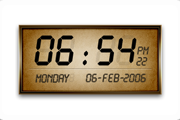
A Digital clock for your desktop!
Screenshots
Comments (20 on the original page, latest shown)
Download
Works with Opera 9 to Opera 12.
About this widget
| Downloads | 205,945 |
|---|---|
| Category | Time and Date |
| Version | 1.0 |
| Size | 2KB |
| Last update | December 6, 2005 |
| Devices | desktop, tv |
| Original page | Internet Archive |
Excellent! -- and much kinder on the CPU than the analog clock (though that, too, is an amazingly well done widget). Does everyone know that widgets can be resized the same way as any web page? Tap grey [+] and [-] on numeric keyboard, for example, use [*] to go back to 100% Thanks again for a fine widget.
P.S. -- on the Windows Task Bar, in "normal" state, it says "file://localhost..." instead of an identifiable widget name, which would be more helpful.
I like it, I like it! BluesJack...listening to the Blues; it makes me happy!
My favorite of the Widget clocks, in part because the seconds counter is unobtrusive.
Is there any way for the user to change the display, so instead of 03:00 pm it just reads 3:00 pm?
this thing is too big! and we should be able to change the color if we want to, the color doesn't look good And there are too many extra space around the numbers and date
ok, I just realized that I can make it smaller by pressing the - key you should allow the users to change colors
preppyjock, Try this digital clock . It has adjustable size and all colors settings is also configurable
top widget
good widget
ya this is a very good Digital clock
It is great that it uses 4 digits for the year. I would like to see support for: 1. 24 hour clock and 2. different date formats. E.g. ISO 8601 (see http://shrinkster.com/11fi). Either by using the Regional Settings (Windows only?) or some other means to set it.
Should have been (ISO 8601): http://shrinkster.com/11fi
very funny style
Очень красивый стиль ----------------------------- спа си бо
Here is another widget for websites: http://www.devbox.info/widgets/digital-flash-clock
Thanks. Many Many Thanks.
this is great. just the job. many thanks
I think this is the best digital clock widget for opera!
i go to back side and i choose 24 Hour system but there is no way i can turn back to the front side after that....... the button i pressed to go to the back side does noting the small "x" just closes the clock (so does the big "X" of course) the "reload" just gets me the 12h back.... is there anything i missed ???? windows xp home (original)