
Add-ons › Widgets › Web Developer

easyGRID!
Description
This widget is a grid for multiple purposes. It can be used over any application that doesn't support grid controls by itself.
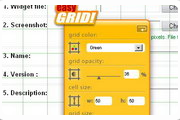
It is very configurable, you can set the color, opacity level, cell size and the grid size if needed.
So now you can align elements on your desktop easily! such as other widgets, or maybe use it as a ruler.
Of course any suggestion is welcome
Screenshots
Comments (15 on the original page, latest shown)
Download
Works with Opera 9 to Opera 12.
About this widget
| Downloads | 16,061 |
|---|---|
| Category | Web Developer |
| Version | 1.0 |
| Size | 36KB |
| Last update | June 4, 2006 |
| Devices | desktop |
| Original page | Internet Archive |
All versions
- easygrid_-1_0.zip 36 KB (recovered copy)
This is very cool. I am using it right now and can still use the text box behind it. I'll try this out with other applications. The drop down menus and sliders weren't very smooth. Random suggestions: Could use a 'snap to window edge' for the grid, a more minimized 'widget body' without the big cool logo, and some text providing the size of the grid on the screen. Like a little green '50x50px' in the corner or something.
piper_noiter: thank you for your comments. We are working on a new version of easyGRID! with a lot of improvements and extra features. Off course, the features you suggest will become available in the new version for sure.
The S8 Delta Chrome Video card with the S3 Chrometal 4 driver (v. 6.14.4.0) is totally unsupported - I get the BSOD as soon as I click the download button.
I just used it to check something on my desktop, it is really nice. The fact that the grid can be resized and moved around make it really useful, even programs that support grids do not have that behaviour.
some lower limitation for the cell size would be nice as well... when you accidentially enter 1 as cell size (or even worse... in both width and height) it gets pretty hard to turn it back because of the very high processor usage
am using windowsxpsp2. All that I get to see is the name easy grid,the grid is missing! I have had no problems with the other widgets I have downloaded. What is the problem? Sorry! figured it out.You have to double click to get cracking! Very useful widget!
Good enough. Ya wanted suggestion, don't ya? Could you make it changeble online: for example, if i moving trackbar for transparent, i wanna see the result permanently. Hm. And, of course, i think, that WID needs mo colours. Sorry for my eng... Hope, ya understood=)
this Widget does nothing on my system. what am i doing wrong? do you have a suggestion for me to try which might remedy this inoperability? perhaps there is a test i might perform to discover if my system is capable of using this widget? thank you. (if there is a support section unique to this widget, i apologize-- i missed it) EDIT: NOTE - i was using Opera v.9.02 , and then upgraded to v.9.10, which i installed into a new folder, thereby essentially creating a completely new installation. now, using this "new" Opera, the Widget is working -- at least i am now able to see the same parameter settings as are in the preview (as shown above). i'm confident that it's doing fine now. thank you. very cool idea by the way.
That's pretty cool! I'm not sure what I can use it for - but, I like it.
nice tool but some size like size e.g. cell size 40x40 and grid size 180x900 does'nt go
This one is very useful for me, especially for my graphic design. Thank You
How about an option that makes the cursor lock on to intersections in the grid?
OK what am I doing wrong? I launch it but nothing happens. I'm using Vista 64 and Opera 10.53 Is it comparable with vista 64?
Doesn't work, no matter what I try.
no visible windows on start, so it dos not work