
Add-ons › Widgets › Web Developer

Hello World!
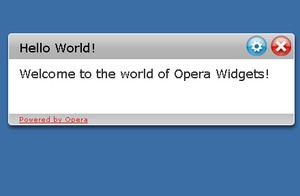
Demo widget from the Hello World tutorial.
Description
A companion widget for the introductory
Opera Widget tutorial
. This tutorial will show you the basics in creating a widget.
Screenshots
Comments (20 on the original page, latest shown)
Download
Works with Opera 9 to Opera 12.
About this widget
| Downloads | 12,763 |
|---|---|
| Category | Web Developer |
| Version | 2.1 |
| Size | 21KB |
| Last update | January 23, 2008 |
| Devices | desktop |
| Original page | Internet Archive |
the tutorial page for this widget needs to be corrected... http://dev.opera.com/articles/view/your-first-widget/ there's a 'typo' in the index.html code listed under 'Adding interactivity'...looks like possibly a cut-and-paste error near the element, the id is not showing up correctly
I followed the example, but it's not clear where files should go ? PNG go in images, but can the others go anywhere ? I ask because when I open the .xml from a temp directory all I get on the screen is Hello World! This is the very first widget written! 454 300 John Doe john.doe.com Acme Examples, Inc. example.com HelloWorld 2006-01 The index.html just gives a Hello World! If the files are all in the programme directory, index.html works fine, but we can't be expected to put all widget related files there surely ?
Files can go anywhere, just like when creating normal web pages. You can make a dir called "bluechicken" and reference images in it like this:
I am having what feels like major widget issues. Not only do I get the same display as SteveW, but it doesn't seem to matter where I put the files. Also when I click to download a widget, (not only the "Hello World" example, but also others) I get a bunch of control characters and no file. I am running 8.53. Do I need something in addition to plain Opera? It doesn't say so anywhere.
oversite, it says that you need Opera 9 beta to run the widgets. As version 9 is still in public testing, you may or may not want to install it. You can download it here: http://www.opera.com/download/index.dml?ver=9.0b
According to the Hello World tutorial: "During development, widgets can be opened by opening the config.xml file in the browser, either by dragging it from a file manager, or by using the File → Open menu." I wish that worked for me! I get the same results as SteveW. Opera doesn't seem to be noticing that config.xml file is a spec for a widget. Am I going to have to install my own Apache server to serve the widgets to myself? I'm using the Debian (Etch) version of Opera 9. ---- UPDATE: Judging by the comments posted in other forums, this seems to be a problem with Opera for Linux. I have found a workaround. If I package my widget in a zip file with the .zip suffix (".wdgt" seems to be bogus), and then open it by drag-and-dropping from my file browser onto Opera, Opera *will* treat it as a widget. I have also tried installing a local Apache server and serving the widgets from there, in accordance with the instructions at http://my.opera.com/community/dev/widgets/deploy/, but without success, although this could be a matter of finding the right server configuration settings.
I am having the same experience with the Hello World files; and I am running MacOSX. I've left posts on those other threads as well. HOWEVER -- please look at my post for my latest findings. Maybe we can script or automator a group of actions for a .widgettest script? http://my.opera.com/community/forums/topic.dml?id=148174&t=1152407667&page=1#comment1642886
good
привет!
Wonderful!
I hope i could resize it . anyway its so wonderful
Hi! I have some widjets. I've downloaded them from this site. Where did they save?
Sicon, they should be accessible from the widgets menu from Opera.
where can i get the source of a widget?
Where is the source. The tutorial is missing some of the image files. Hard to follow when files are missing, eh?
its nice, just wish we could resise... Hey! here's a RSS reader created by Widgetize, uses the bbc front page news area. go to: http://widgets.opera.com/widgetize/Feed%20Reader/Classic/?serve&skin=dragon&widgetname=FSX%3A%20Newsreader%201.0%3A%20BBC%20%3A%3A%20News%20Front%20Page&url=http%3A%2F%2Fnewsrss.bbc.co.uk%2Frss%2Fnewsonline_world_edition%2Ffront_page%2Frss.xml&rel=myopera&ref=
just wondering... where is the source codes and suff for a widget located?
good job. cool widget, I like the change the text
Not bad as an introductory to widget. Thanks
Example widget does not work any more in Opera 10 Final.