

Japanese Flashcards
Simple widget for displaying Japanese flashcards.
Description
Learn basic Japanese words with this easy-to-use flashcard widget. Japanese words are displayed followed by their English translation. Customize how long the Japanese and English words are displayed.
To view advanced settings, press the settings icon twice. Pressing settings once shows general settings.
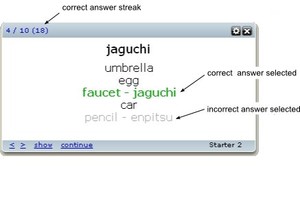
You can quiz yourself with multiple choice questions. When the first side of the flashcard is showing, click on the word to view a multiple choice question. Select the right choice and it displays in green. Click on it again to move to the next card.
Version 1.13
- works in Opera 10
Keyboard Shortcuts
[Right] -- Next card
[Left] -- Previous card
[Ctrl][Right] -- Next topic
[Ctrl][Left] -- Previous topic
[Up] -- Show translation
[ s ] -- Shuffle cards in current topic
Hiragana and Katakana Support
Your PC needs to support East Asian languages. To install East Asian language support go to the
Microsoft site
Screenshots
Comments (5 on the original page, latest shown)
Download
Works with Opera 9 to Opera 12.
About this widget
| Downloads | 9,591 |
|---|---|
| Category | Travel |
| Version | 1.13 |
| Size | 72KB |
| Last update | August 28, 2009 |
| Devices | desktop |
| Original page | Internet Archive |
Possible to have user-entered wait times for Japanese and English displays? For example, 1.0 is too fast, and 2.5 is too slow.
Thanks for the update. The shortcuts work well. Can you implement a shuffle option so that each time a set restarts it shows differently? Right now I seem to be memorizing the order of each set instead of the individual words' meaning.
Nice interface and very good and useful widget. One suggested item; can it be made so that the Japanese word is shown in Kana, Hiragana and/or Katakana as well as the romanic version before showing the English word. It would make it easier for me to learn the kana in the Japanese translation.
sugoi! added to my adorable widgets collection, arigatô gozaimashita.
Nice. I notice though that to save the settings it seems to require cookies to be enabled, which I don't think I've encountered with other widgets. Also, like darroncollins wrote, it'd be nice to have *both* the kana and romanji on at once. Anyway, thanks for the widget.