
Add-ons › Widgets › Fun and Games

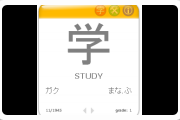
Kanji of the Day
Whether anime enthusiast, closet linguist, or serious student of the Japanese, Chinese, or Korean languages, learning the basic Japanese, Chinese, or Korean characters (kanji, hanzi, hanja, as well as hiragana and katakana, and hangul) is fun and useful for everyone!
Description
Whether anime enthusiast, closet linguist, or serious student of the Japanese, Chinese, or Korean languages, learning the basic Japanese, Chinese, or Korean characters (kanji, hanzi, hanja, as well as hiragana and katakana, and hangul) is fun and useful for everyone! You can also use the quiz feature for testing your knowledge or practice. This widget will ensure you get your daily dose of mental training. I also run a web page called
Japanese for Programmers
that might be of interest if you want to work with software development in Japan.
Screenshots
Comments (20 on the original page, latest shown)
Download
Works with Opera 9 to Opera 12.
About this widget
| Downloads | 40,396 |
|---|---|
| Category | Fun and Games |
| Version | 6.0 |
| Size | 364KB |
| Last update | July 10, 2006 |
| Devices | desktop |
| Original page | Internet Archive |
I find this vaguely amusing for some reason. I think it's because it's like being back at primary school... XD
vaniteh: if you got to study kanji in primary school i'm envious
I have a problem with this widget. None of the characters show up when I open the widget -___-.
Will you ever do something like this for other browsers (or it's already possible to use it with them)? Please reply. Thanks a lot! This widget is simply great! If you can, please add the option to show new card more often (for example, between every 15 seconds to 15 minutes). I really need it while I'm repeating the most basic kanjis. Thanks! kaeovo P.S. Would it be possible to make this widget into a standalone application? I'd pay for it!
jasontransays: I've seen that bug too (never on my own computer though). I'll look into it for the next version. kaeovo: Thanks! I will probably port this widget to Mac Dashboard and Windows Sidebar gadgets some time. More frequent time options will be in the next version. Not possible without rewriting everything, but the MS Gadget/Mac Widget versions will at least run pretty much like a regular application.
Just a note for Windows users In case you only see square characters, you are missing the East Asian Languages files in your computer. For Windows XP do the following: (a) Make sure you have your Windows XP CD/DVD in your CD/DVD/HD-DVD ROM. (b) And then go to your "Control Panel", access the "Regional and Language Options" and select the "Languages" tab. (c) Check the "Install files for East Asian languages" and click "Apply". (d) After it is finished, RESTART your PC. Dattebayo.
Hefa, don't want to push you or anything (yeah, right ), but could you give us any hints as to when we could expect the next version? Don't mind my being anxious, I just love your widget so much! If Sidebar gadgets and MS Gadgets are pieces of software that can run on their own (without starting main application (in this case Opera) first), then it's definitely a way to go! Looking forward to your comments! kaeovo EDIT: OK, I've found some info about Sidebar Gadgets / MS Gadgets. They're wonderful and can be executed on Windows XP!
This is pretty nice to remember characters you forget once in a while, but still not quite trustworthy. It gives you a good impression on how the characters look and are build up but dont trust the translation with the writing. I found some errors like in the chinese character Ta (He, she) but the characters are different from wether they mean he or she. Example. He is 他 but she is 她. Note that the beginning of the female Ta is different than the male ta. And some other stuff. Otherwise it's pretty cool.
I need some advice. The widget is displying just sqares but no characters. What shall I do. Thank U.
I really want to use this, but on a 1 ghz machine it's very slow. Plus I can only see a single lesson. The top buttons do not respond, and the config page is blank. :-(
SajaTo: I think you need to install Asian fonts.
Just uploaded version 6 with an Opera 9.5 fix and new version checking.
hefa, do you think you could write a haiku generator (a small and simple program) like the ones for Yahoo! Widgets? I have searched through the Opera widgets and have not been able to to find any haiku generators. Click here for examples: http://widgets.yahoo.com/gallery/index.php?search=haiku+generator&x=0&y=0
GTB: I'm sure I could write one easily, but you can already find many haiku generators on the web, and I don't see any added value of having it as a widget. Besides, I am of the somewhat old-fashioned opinion that poetry is better composed by humans...
Just wanted to say "thank you". =D
Excellent widget :-) I have it running in the corner of my screen all day to try and learn some chinese
Thanks! That's brilliant!!!
this is very useful, thanks!
unfortunately this is not working, afer first run, you only get a blank screen, it has one issue that is really bad, it is related to the saving of settings or version.js, i tried to fix it, but is garbage. the problem is in kanjiodtheday.js file
Please fix it. It runs good only once. After restarting computer it shows only blank screen. Maybe it has something to do with administrative privileges?