
Add-ons › Widgets › Time and Date

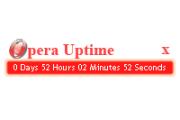
Opera Uptime
Displays Opera's Uptime.
Description
Keep track of how long you've left Opera open on a per session basis or just over-all uptime!
This widget displays Opera's Uptime in a fairly compact, nice and clean way.
To change between tracking uptime for a session and uptime over-all, click the "?" icon and change the "Save Time" option.
To see a changelog or use previous versions visit:
http://kyleabaker.com/goodies/coding/opera-uptime/
Screenshots

Comments (8 on the original page, latest shown)
Download
Works with Opera 9 to Opera 12.
About this widget
| Downloads | 3,647 |
|---|---|
| Category | Time and Date |
| Version | 1.2 |
| Size | 25KB |
| Last update | August 19, 2008 |
| Devices | desktop |
| Original page | Internet Archive |
o my god i love it nice
thank I will try to use it
Nice.
good when dose it shut off? and dose it keep timing after i close it ?
It doesn't disappear on it's own, but once it is closed it no longer times. It is intended to be opened with Opera and just sit on your desktop. There is no what to retrieve the uptime from Opera, so it just times according to how long it has been opened, assuming that you opened it with Opera. Good question tho!
Opera Uptime v1.2 should become live shortly. The full changelog can be found at: http://kyleabaker.com/goodies/coding/opera-uptime/ Notable changes include: -Ability to save uptime between Opera sessions to continuously count or of course only time each session. -JQuery fade effects. -Redesigned logo. Enjoy!
Nice widget! It would be cool if it was possible to hide it completely however, as in widget.hide() (see http://dev.opera.com/libraries/widgetobject/docs/widget.dml#hide), since task bar space is often precious.
Can it be set to show the full time Opera has been open, not just the time the widget has been?