
Add-ons › Widgets › Fun and Games

Opera Users Online
Description
Simple widget which shows you how many Opera users is online. Well, actually, how many users of that widget is online.
When running for the very first time, you have to input your name (make sure it is unique), country where are you from and coordinates of your town.
Widget will try to connect to
http://www.ip2location.com/
website, and grab from there your coordinates.
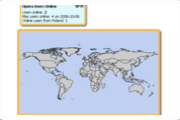
Widget shows number of max user online, and number of online users from your country, as well.
It shows Top 10 countries of Opera users and map of the World with dots coresponding to coordinates you've enter (history of last 24 hours).
TODO:
- Better graphic
Version 0.1.2 - Autorefresh fixed. Some small fixes as well.
Version 0.1.3 - You may choose to not enter coordinates. You will be not listed on map of the World.
Version 0.1.4 - Configuration panel is available whole the time (YES you can change coordinates wherever you want)
Version 0.1.5 - Autograbbing coordinates added. Thanks for URL maels1!
Screenshots
Comments (6 on the original page, latest shown)
Download
This file has not been recovered yet. Do you have a copy? Tell us.
About this widget
| Downloads | 43,206 |
|---|---|
| Category | Fun and Games |
| Version | 1.1 |
| Size | 32KB |
| Last update | October 6, 2006 |
| Devices | desktop |
| Original page | Internet Archive |
First time configuration: 1. Name - make sure it is unique eg. "remick at home" 2. Country - it is quite easy 3. Coordinates. I suggest http://maps.google.com/ service. While you'll find your place, open in new tab URL "Link to this page", and you'll notice coordinates in address bar. Put them exactly in shown format, eg. N: "51.105684" E: "17.111442". Important is that dot is decimal pointer. The range of coordinates is -90..90 for N, and -180..180 for E. One more thing. You have to allow widget flash file, for downloading configuration file from the internet.
Wov, this was really hard to configure... I lost one account! I can't decide how many stars I'll give this.
you could use a seperate webpage with a google map and have a link on the configs to take you to that page where the "account" could be set up?
too hard to configure... think: ease of use
Well, its not hard to configure, in fact is real simple, name and country its trivial, about the coordinates i suggest http://www.ip2location.com/ its easier than google one.
Thanks for URL. It is really great. It shows actually coordinates of whole town/city, but for most of people should be enough. I've just added autograbbing feature to widget. One more time thanks for URL. I've noticed also, that sometimes http://www.ip2location.com/ shows wrong coordinates. If you see that, just open config again.