
Add-ons › Widgets › Web Developer

Photo Size Calculator
Description
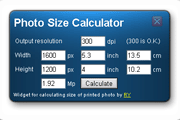
Calculates size of printed photo from its size in pixels and desired resolution.
Screenshots
Comments (10 on the original page, latest shown)
Download
This file has not been recovered yet. Do you have a copy? Tell us.
About this widget
| Downloads | 24,036 |
|---|---|
| Category | Web Developer |
| Version | 1.1 |
| Size | 13KB |
| Last update | November 19, 2007 |
| Devices | desktop |
| Original page | Internet Archive |
Why there is the Javascript virus JS/Dldr.Small.B in your linked page?
What a virus? I think this is reaction of Avira Antiviruses on some counters with javascripts (found this info at various forums), but at this moment no description of such virus present at their site (www.avira.com). P.S. Sorry if my english not good enouph
I love this widget!!! Very nice work Lovely design, good functionality... Класно получилось
I would really love to use this widget. But I need to know a bit more about the virus with javascript. lol Cant afford a virus. Or is some scans picking it up as a virus but it is really not?
It could be improved by adding an aspect ratio control!
New features in version 1.1: - aspect ratio control is added; - calculated fields are read only. P.S. Linked page is just my personal page with some of my programs, photos, verses, etc. It doesn't contain any viruses, but there are some java-scripts in menu and visit-counters, so some antivirus program can make a mistake about them. Site was inspected by NOD32, Kaspersky AntiVirus and Norton Antivirus - they don't detect anything.
very good
thanks a lot ^^
Looks handy, but i found it to be unacurate for the way i wanna use it (various dpi images): Example with a 1600x1200 pic - 300 dpi : 13.5 x 10.2 cm - 150 dpi : 27.1 x 20.3 cm! - 72 dpi : 56.4 x 42.3 cm!!
It is not good idea to print pictures with small resolution (as 72 dpi), but if you use smaller printer resolution, you'll get a bigger picture: 1600 pix / 72 dpi = 22.(2) inch = 56.(4) cm. If you want to determine size of printed picture regardless its current resolution, type in resolution of your printer (and don't look at resolution, settled by your camera - you need only picture size in pixels).