
Add-ons › Widgets › Miscellaneous

QReator
QR code creator
Description
About QReator
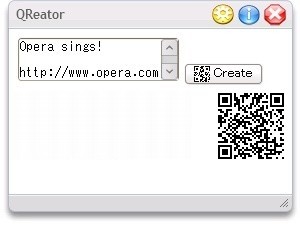
QReator uses
Kazuhiko Arase's JavaScript library
to create
QR codes
containing data such as text, URLs, email addresses, etc. which can then be scanned and decoded by devices, e.g. mobile phones, with the relevant software.
Thanks to the help of
Mo0nman
the QR code can be saved as a PNG file. If that doesn't work for you, take a screenshot (press the [PrtSc] key) and paste it into some
graphics software
.
The size of the QR code can be changed to suit the amount of data, as can the error correction level. The higher this is set, the more damaged the code can be while remaining readable. I've written a post about how this feature can be used to
customise QR codes
, e.g. to include Opera's logo.
Daniel Davis
Screenshots
Comments (4 on the original page, latest shown)
Download
This file has not been recovered yet. Do you have a copy? Tell us.
About this widget
| Downloads | 7,266 |
|---|---|
| Category | Miscellaneous |
| Version | 1.1 |
| Size | 35KB |
| Last update | May 19, 2009 |
| Devices | desktop, tv |
| Original page | Internet Archive |
Hi, you can export the image to the browser by drawing the image to a canvas and then using the toDataURL method of the canvas to get a data url with the encoded png image that you can send to the browser...
Hi d4n3, I thought there must be a way so I appreciate the explanation. I'll give it a try when I get a few moments. Thanks.
not the best but better than nothing... you'll need to change the border color to white or just remove it // Define a namespace to hold our widget-specific functions and avoid polluting the global namespace var qreator = qreator || {}; qreator.welcome_text = 'Enter the data to embed in the QR code here.'; /** * Hide config and about pages and add welcome text. **/ qreator.init = function () { document.getElementById('config').style.display = 'none'; document.getElementById('about').style.display = 'none'; document.getElementById('txt_input').value = qreator.welcome_text; }; /** * Clear the input textarea. **/ qreator.setText = function () { if (document.getElementById('txt_input').value === qreator.welcome_text) { document.getElementById('txt_input').value = ''; } }; /** * Create and display the QR code. **/ qreator.createQR = function () { qr_canvas_out_px = prompt('please enter the pixel size you desire',10); qreator.showMessage(' Thinking...'); document.getElementById('qrcode').innerHTML = ''; var qr_error = parseInt(document.getElementById('sel_error').value); var qr_size = document.getElementById('sel_size').value; var qr_input = document.getElementById('txt_input').value; var qr_output = ''; var qr_canvas_output = ''; var qr = new QRCode(qr_size, qr_error); try { //Run some code here qr.addData(qr_input); qr.make(); qr_output += ''; qr_canvas_output += ' '; qreator_popup=window.open('','qreator_popup','toolbar=yes,menubar=yes,width=500,height=500');ndoc=qreator_popup.document;ndoc.write(qr_canvas_output);ndoc.close(); // prompt('this is the qr_canvas_output, u can save it as html and open it with opera',qr_canvas_output); document.getElementById('qrcode').innerHTML = qr_output; qreator.showMessage('To save this QR code, take a screenshot (press the [PrtSc] key) and paste it into some graphics software. '); } catch (err) { //Handle errors here qreator.showMessage('Sorry, your text is too long for that size QR code. Click here to change the settings.'); } }; /** * Displays a message in the "message" element. * * @param message Message to display **/ qreator.showMessage = function (message) { document.getElementById('message').innerHTML = message; }; /** * Changes the front display to the about or config page. * * @param action (Optional) Sets the action to perform (about/config) **/ qreator.flip = function (action) { var frontdisplay = document.getElementById('front').style.display; var configdisplay = document.getElementById('config').style.display; var aboutdisplay = document.getElementById('about').style.display; function showFront() { document.getElementById('front').style.display = 'block'; document.getElementById('config').style.display = 'none'; document.getElementById('about').style.display = 'none'; document.getElementById('btnAbout').className = ''; document.getElementById('btnConfig').className = ''; } function showAbout() { document.getElementById('front').style.display = 'none'; document.getElementById('config').style.display = 'none'; document.getElementById('about').style.display = 'block'; document.getElementById('btnAbout').className = 'ctrlbtn_on'; document.getElementById('btnConfig').className = ''; } function showConfig() { document.getElementById('front').style.display = 'none'; document.getElementById('config').style.display = 'block'; document.getElementById('about').style.display = 'none'; document.getElementById('btnAbout').className = ''; document.getElementById('btnConfig').className = 'ctrlbtn_on'; } if (action === 'config') { // Display/hide config view if (configdisplay === 'block') { showFront(); } else { showConfig(); } } else if (action === 'about') { // Display/hide about view if (aboutdisplay === 'block') { showFront(); } else { showAbout(); } } else { // Display/hide front view showFront(); } };function make_canvas(){var c = document.getElementsByTagName(\'Canvas\')[0],d = document.getElementsByTagName(\'Object\')[0],ctx = c.getContext(\'2d\');'; for (var r = 0, count = qr.getModuleCount(); r < count; r++) { qr_output += '<tr>'; for (var c = 0; c < qr.getModuleCount(); c++) { if (qr.isDark(r, c)) { qr_output += '<td style="border-width: 0px; border-style: none; border-color: #0000ff; border-collapse: collapse; padding: 0; margin: 0; width: 2px; height: 2px; background-color: #000000;"/>'; qr_canvas_output += "ctx.fillStyle='black';ctx.fillRect("+r*qr_canvas_out_px+","+c*qr_canvas_out_px+","+1*qr_canvas_out_px+","+1*qr_canvas_out_px+");"; } else { qr_output += '<td style="border-width: 0px; border-style: none; border-color: #0000ff; border-collapse: collapse; padding: 0; margin: 0; width: 2px; height: 2px; background-color: #ffffff;"/>'; qr_canvas_output += "ctx.fillStyle='white';ctx.fillRect("+r*qr_canvas_out_px+","+c*qr_canvas_out_px+","+1*qr_canvas_out_px+","+1*qr_canvas_out_px+");"; } } qr_output += '</tr>'; } qr_output += '</table>'; qr_canvas_output += '}
What would be great and original would be the possibility of creating Qcode vcalendar entries for Nokia phones... No one has managed so far...