
Add-ons › Widgets › Miscellaneous

Quiz Processor
Multiple choice exam trainer
Description
Widget meant for supporting learning, with multiple choice questions.
Just Open a plaintext (.txt) file with questions to start.
Format:
Question
Answer[space][0 or 1, wrong/right answer]
Answer[space][0 or 1, wrong/right answer]
...
[optional empty line]
Question
...
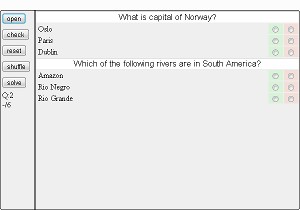
Example you can see on the screenshot above:
What is capital of Norway?
Oslo 1
Paris 0
Dublin 0
Which of the following rivers are in South America?
Amazon 1
Rio Negro 1
Rio Grande 0
In case you have "one-liners" you should use
[question (like "sky is blue" or "is snow white?")]
[correct:][ ][0/1]
format, as if you only have "answer-lines" they will not be shuffled
Just create a .txt file according to format above, click "open" and select the file.
[Check] will show you if answers you choose are correct
[reset] clears slections
[solve] shows you right answers
[shuffle] shuffles the questions
Screenshots
Comments (2 on the original page, latest shown)
Download
This file has not been recovered yet. Do you have a copy? Tell us.
About this widget
| Downloads | 1,016 |
|---|---|
| Category | Miscellaneous |
| Version | 1.1 |
| Size | 30KB |
| Last update | September 17, 2010 |
| Devices | desktop |
| Original page | Internet Archive |
Nice widget. But a question: Can I have an real example for an one-liners? I don't understand the using of the [ and ] signs. Thanks
Real example is in the desription: What is capital of Norway? Oslo 1 Paris 0 Dublin 0 Which of the following rivers are in South America? Amazon 1 Rio Negro 1 Rio Grande 0 this is valid text. another possibility would be snow is white this is true 1 sky is green this is true 0 and so on.