
Add-ons › Widgets › Miscellaneous

RapidLoader
Automatically open RapidShare (and other) links in seperate tabs
Description
We all know how annoying it is when you're browsing rapidshare forums and all the links are "code"'d, and you have to copy and paste each link into your browser to download the file.
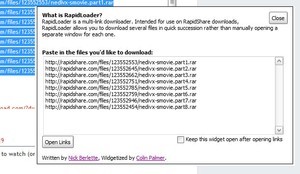
Well, not anymore. Just copy the whole lot to the textarea and click 'Open Links'. Each page will be loaded as a tab automatically in your browser, ready for download options.
The widget will also automatically close after links are loaded (unless you tell it not to).
*updates in v2.0:*
Major: Links will only open if they start with 'http'. Optionally, you can append 'http' to every line by checking the box. Blank lines will never be loaded.
Minor: Textarea clears when you click on it.
Leave a comment if you like it! Suggestions are welcome!
Screenshots
Comments (2 on the original page, latest shown)
Download
This file has not been recovered yet. Do you have a copy? Tell us.
About this widget
| Downloads | 43,716 |
|---|---|
| Category | Miscellaneous |
| Version | 2.0 |
| Size | 3KB |
| Last update | August 24, 2008 |
| Devices | desktop |
| Original page | Internet Archive |
nice
A good idea.