
Add-ons › Widgets › Miscellaneous

real-night-time Speed Dial
Speed Dial Widget
Description
store your favorite sites for fast access
Screenshots
Comments (13 on the original page, latest shown)
Download
Works with Opera 9 to Opera 12.
About this widget
| Downloads | 43,255 |
|---|---|
| Category | Miscellaneous |
| Version | 1.0 |
| Size | 11KB |
| Last update | April 26, 2008 |
| Devices | desktop |
| Original page | Internet Archive |
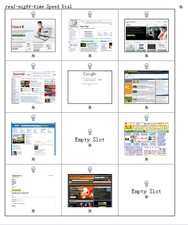
How to Use : to add a site, first click on a bulb in a slot http://files.myopera.com/iliiad/albums/252249/rnttspd1.jpg then a URL address bar pop up (down? ) at the bottom http://files.myopera.com/iliiad/albums/252249/rnttspd2.jpg enter a URL, press enter or click the Enter button, and the site is added to the slot. http://files.myopera.com/iliiad/albums/252249/rnttspd3.jpg to delete a site, click the cross button under the slot.
It says thumbnail in the works forever no picture? In 800x600 res. url insert dialog is not visible, a bit smaller would be okay. Thanks.
Excellent idea! I'm a nut for this speed dial stuff. Works well, good job.
Can you make it so there's sortable categories, with some next / prev buttons under the thumbs? This would be great for web admins who have several front-end pages, back-end logins, general administrative pages that they need to visit on a regular basis. Of course, there could be so many other uses, too... That's the only real improvement I would like to see. Other than that, it's great. Thanks...
Not bad, but if you try to save a secure site eg https://www.xxx.yyy.zzz, it will only give you the unusable http://https://www.xxx.yyy.zzz as it ads the http:// automatically and I don't think it can be altered.
How is this different from the speed dial built-in to Opera? What I'm looking for a multiple speed dialers. For example, I'd like to separate Opera windows, each with a different speed dial so that I could have one window with tabs / speed-dial for financial websites, another for busiess logins, and another for the online reference and research sites I use. G
Nice effort, cheers. What I am looking for is a 3down by 5across speed dial to fit with my 1920x1200 res. All on 1 screen. Would appriciate if you could oblige.
I agree with other comments here. I would love to have several speed dial pages where I can catorgorize sites better---have one speed dial page for different subjects. Is this available? If so, how do I do it? If not, when will it be available? Angela
Hello. I love the speed dial feature of opera. I use very often but my only problem with it was that it didn't have enough thumbnails. My questions are: 1. can you open this widget as a tab in the opera window 2. can you add more thumbnails to this widget 3. does anybody know how to add more thumbnails to the original Speed Dial feature of Opera and if not do you know if they are working on that so we can add more thumbnails (i just don't use the bookmarks as much, I love Speed Dial) Any response is greatly appriciated. Thanks.
A Speed Dial like Maxthon has. You can have 25 or 30 sites per page if you want and I believe you can have up to 10 pages, maybe more can't remember what was said. A speed dial like that would be awesome. Check it widget makers, can't be that hard to do.
Is there any way to make it so that you can use the speed dial as your homepage, and when you click on one it opens a new window instead of changing the speed dial page to that page?
I can't get the images for the websites to load into the speed dial.....
for the record you can change the amount of speed dial windows beyond the piddly 'configure speed dial options'. 1. click on menu 2. click on help 3. click on 'about opera' 4. under the heading 'paths' make a note of the address for 'preferences' (or better still highlight and copy by clicking 'cntrl + C' 5. open up any folder on your computer and go into the address bar and paste ('cntrl + V') the address you copied above but substitute the word 'speeddial' for the word 'operaprefs' (so it says 'speeddial.ini' instead 6. hit the return button and it should open up a text document 7. scroll down to the bottom of the page where it says 'size' 8. enter in the amount of rows and columns you want then click 'cntrl + S' (to save) 9. Restart Opera and you should see that it has changed the speed dial boxes to what you set (Ive found that Windows 7 seems to take some time to do this so you may have to restart opera again before the changes are done. 10. if youre happy with the layour then close the speeddial.ini text file 11. hoorah!