
Add-ons › Widgets › Web Developer

Ruler
Description
Description
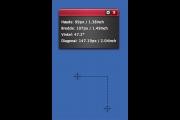
This widget is a screen ruler that enables you to measure the width, height and diagonal of any object on the screen.
To use it simply drag the two markers around to the area you want to measuree. You can move the first markers pixel by pixel by using the arrow buttons. To move the second marker you have to hold Ctrl(Windows)/Command(Mac) while pressing the arrow keys.
Currently limited to the primary screen only.
Screenshots
Comments (13 on the original page, latest shown)
Download
Works with Opera 9 to Opera 12.
About this widget
| Downloads | 43,074 |
|---|---|
| Category | Web Developer |
| Version | 1.1 |
| Size | 32KB |
| Last update | June 18, 2008 |
| Devices | desktop |
| Original page | Internet Archive |
Nice tool! Thanks! I would like to see couple small improvements: Add option to show/hide secondary unit (inch/cm) Add option to make main widget window semitransparent (only when not in preferences mode)
Thanks.
perfect widget design tool
Any chance this will be updated to work with 9.5? I'm already missing it ...
Thanks, works great in 9.5 and 9.6!
Best ruler so far... Waiting for second monitor
Great Widget... very useful to determine the dimensions of flash movies that should be visible even with all the toolbars people add to Internet Explorer... if you know what I mean! Thanks... and I'm agreed with alicroche... Best ruler so far!
Excellent tool - makes my web and graphic design work easier!
Great widget! Incredibly useful.
Well done, great tool!
It work only in one monitor configuration? Impossible to move widget on the 2nd screen...
Would be great if it worked on a dual-monitor setup. The DataRat
It can work on dual monitors in windows 7 if you hit "shift + window's key + left arrow or right arrow"