
Add-ons › Widgets › Web Developer

Screen Ruler
Measure pixels on your screen.
Description
WARNING: The development of this widget by me is OVER. Some parts of it or the whole widget may be broken. I cannot remove my widgets, broken or not, once they are uploaded thanks to awesome Opera Software policy ("No, you can't delete your own widgets"). So there you go.
Also from now on my code and graphics in this widget is released into public domain.
***
A virtual ruler! It's a useful tool for web designers and maybe for others too
Simply click the grid in two places to measure the distance between the points (in pixels). To remove the points, click again. You can create straight lines with Shift key. You have to right click this widget to close it, because it covers the whole screen.
A simpler version of the ruler is included for Linux users, because widgets on Linux have problems with transparency. It will be detected and enabled automatically if you don't use Windows or Mac.
Screenshots
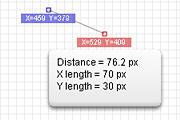
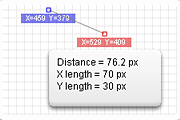
Comments (20 on the original page, latest shown)
Download
Works with Opera 9 to Opera 12.
About this widget
| Downloads | 145,353 |
|---|---|
| Category | Web Developer |
| Version | 1.7 |
| Size | 4KB |
| Last update | July 4, 2006 |
| Devices | desktop |
| Original page | Internet Archive |
nice one. just came in very useful
Great.It helps me a lot.
ohhhhh it is great
nice tool
GOOOOOOOOD.
This widget is excellent !
Helpful, expecially if one developes low-res games and wonders what pixel hight the main character has
It'll be better if the pointer is small and more accurate
It's very good but I had trouble closing it -eventually guessing that CTRL-W would work. Could you make it ESCAPE-able please? I agree with miblog, about the occasional need for totaling more than one line length (for maps etc). Can you do it please? Or have you done it already?
good program but you cant see where the mouse pointer is, could do with the cross being in another colour and one that you can select yourself so you can adapt it to the colour of the page your meauring!!!!!!
I would love it if you could make a version where you had the grid, except it was only transparent - You could use the mouse normally behind it. Would love support for use of custom images as the transparent thing as well. =o Nevertheless, very nice widget.
This is great idea! But please -try- to fix: When opera on second display, grid is still in first! how about doubleclicking would close and not 2.nd button??
I like this, but the X and Y co-ordinates for the start and end points are illegible on my screen: too small to appear as more than a smudge, and not enough contrast. So I can only use it to measure distances and not actual positions.
This pleases me! Thank you! I would use it for measureing the distance over the Google Maps too. But I want to use my mouse and Screen ruler alternately any second. So if I make a special request, I want a function that I can use my mouse normally as long as I'm pressing Ctrl-key or so.
It's great tool, I strongly recommend it.
One of my most used widgets. Great job on this.
You can create straight lines with Shift key <<<< I don´t cant used it. =[ And I´m need it. t_t
Use this all the time - this is the first widget I install when I install a fresh copy of Opera. Great stuff - does exactly what I want so no complaints from me. Thanks!
Except that "shift key thing" - I can't quite figure out what it's supposed to do as I just click point A then click point B and read the result. I don't see why I would need to draw lines with it (even if I could). P.S. I wish Opera would do something about those spammy comments which keep appearing in the widgets comments - I reported it a while ago (and they even removed some) but it's a shame to have to sift through all the robots' comments to read genuine comments.
Works just fine for me. Don't understand why the developer would want to take it down. But glad he didn't ! The DataRat